There has been an interesting feature in concrete5 which can improve your sites performance noticeably. If you log in to your site and look at the Sitewide Settings screen, you can see this box:
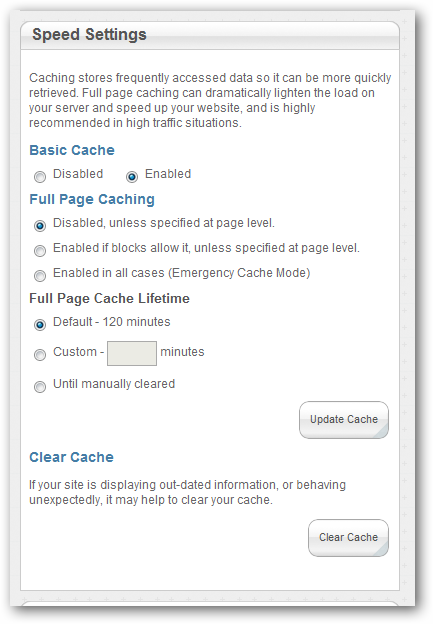
As already mentioned on the screenshot, these settings improve the performance by caching various outputs generated by blocks. In order to get the most out of your own blocks, you should look into this feature a bit closer. Think about this: How does concrete5 know that the output of a block can be cached? It can’t!
Block Cache Options
If you already created your own blocks in the past, your should be familiar with the BlockController. You probably also specified properties like $btTable and $btInterfaceWidth. Now, there are a few more properties you can set. Look at the following start of a BlockController:
class MusicBlockController extends BlockController { protected $btInterfaceWidth = 450; protected $btInterfaceHeight = 430; protected $btTable = 'btMusicPlayer'; protected $btCacheBlockRecord = true; protected $btCacheBlockOutput = true; protected $btCacheBlockOutputOnPost = true; protected $btCacheBlockOutputForRegisteredUsers = true; protected $btCacheBlockOutputLifetime = 60*30; // 30 minutes |
There are a number of variables starting with btCache. All of them are related to the new cache functionality of concrete5. They let you specify if the content changes once a user is logged in ($btCacheBlockOutputForRegisteredUsers) they let you tell concrete5 if the content stays the same if the page is opened using the POST method allowing the cache to be enabled during a form post too ($btCacheBlockOutputOnPost).
You probably won’t be able to measure a huge impact if you’re block doesn’t have to process lots of data in order to print the output. But if there’s a complex method in the background of your block you can use these variables to easily control the cache of the output making your site feel faster.
9 Comments
What about using stuff like XCache & APC?
My production server uses Debian and has XCache enabled, but it looks it does not work due to Zend not having support for Extended interface.
Which cache, in general, can you recommend for C5?
Sincerely,
Gour
Hi Gour!
So far I never had any problems with APC. It runs stable and fast on my servers! As long as it runs on a single server I don’t see a reason why I wouldn’t use APC.
I’m not sure I understand why you can’t use XCache, what do you mean by Extended Interface? There’s a backend for Zend Cache, have you tried to configure XCache as a Zend Cache Backend in your site.php?
http://framework.zend.com/manual/de/zend.cache.backends.html#zend.cache.backends.xcache
Best regards,
Remo
Hello Remo,
thank you for your reply.
> So far I never had any problems with APC. It runs stable and fast on my servers! As long as it runs on a single server I don’t see a reason why I wouldn’t use APC.
How much memory can I expect to dedicate to APC to run few small C5 sites?
> I’m not sure I understand why you can’t use XCache, what do you mean by Extended Interface?
See e.g. http://framework.zend.com/issues/browse/ZF-9150
The docs (http://framework.zend.com/manual/en/zend.cache.backends.html) also says:
“Be careful : with this backend, “tags” are not supported for the moment as the “doNotTestCacheValidity=true” argument. ”
Mnkras also responded in #concrete5 with: “Current backend doesn’t implement the Zend_Cache_Backend_ExtendedInterface, so this method is not available”
> There’s a backend for Zend Cache, have you tried to configure XCache as a Zend Cache Backend in your site.php?
Yes, but if I put e.g.
define(‘CACHE_LIBRARY’, ‘xcache’);
in my config/site.php I do get different rendering with(out) cache. 🙁
That’s whx I did ask on forums (http://www.concrete5.org/community/forums/installation/which-cache-backends-are-usable/#296242) which backend(s) can be used in C5, but, unfortunately got no replies. 🙁
Sincerely,
Gour
Hi Gour,
thanks, I see what you mean!
Most of my sites with APC use 30MB memory, I think that’s also the default value. Cache hits were always okay.
But keep in mind: We’re always working with FCGI which means that every site has it’s own user as well as one or several PHP processes with a APC single cache per user. 100 sites on a server means 3000MB additional memory usage!
If you work with mod_php and share one process as well as one cache for several sites you’d certainly need more than 30MB of APC memory. But I’m not even sure if c5 adds a prefix to every cache entry, if it doesn’t, you’d run into some strange effects because of colliding cache entries.
Personally, I only tested sqlite (slow), apc (good) and memcache (slow, but useful for multi server setups)
However, most of our sites don’t use any kind of cache anymore. I rewrote the autonav block and some page/collection methods which were usually responsible for most of our performance problems.
I’d suggest that one removes the autonav block before thinking about APC & co to see if it improves the performance. If it does change the performance, try to look for different solutions..
Best,
Remo
Thank you very much for useful info.
It seems we’d be better using Xcache since it’s already on the (Debian-based) server instead of using our precious memory in shared hosting.
We do not use mod_php, but use our own instance of lighttpd which works behind nginx front-end.
However, too bad that Zend/C5 cannot use Xcache. :-/
Sincerely,
Gour
Why’s there a difference between XCache and APC regarding memory? Both work the same way and from what I can tell, APC doesn’t use more memory than XCache. You should certainly disable XCache if you use APC but you don’t lose anything if you do that. Well, you’ll lose some time because you have to install APC but that’s not much 😉
> Why’s there a difference between XCache and APC regarding memory?
Because Xcache is installed by the system and in the case of APC, I’d have to install it on my own (along with PHP) and then APC’s memory usage will be counted in my allowed ‘memory quota’ – I do not run my own VPS, but kind of shared hosting (ala Webfaction) and have limit on memory, number of processes, ports available etc.
That’s why I’d like to ‘take advantage’ of system’s Xcache, but, too bad, it’s not possible with C5. :-/
Yo estoy trabajando por primera ves con el adaptador de backend Xcache en Zend Framework y cuando creo el Zend_Cache::factory() se lanza un excepci’on, he buscado ejemplos pero no encuentro ninguno….alguno de ustedes a hecho esto antes???
I’m afraid but I don’t work with XCache and don’t even have an installation where I could try it on my own.