In vielen Fällen soll eine Internetseite Elemente enthalten, die in zwei Spalten dargestellt werden sollen. In diesem Tutorial beschreibe ich einen sehr einfachen Block, um ein Bild einer Person anzuzeigen, so dass die Beschreibung rechts vom Bild dargestellt wird.
Das Ergebnis schaut folgendermassen aus:
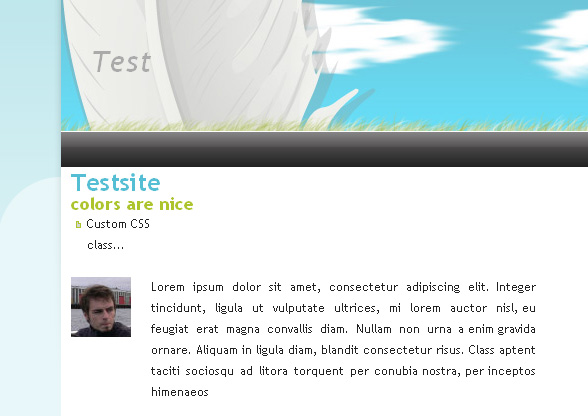
Sometimes content should be presented in two columns. In this tutorial I’ll describe a possible solution that included a very simple block to display a staff/team member with a description on the right side of it. The result will look like this:
Tabellenlayouts
Ich werde hier nicht in die Details über Tabellen-Layouts eingehen. Nur ganz grundlegend – das Tag “table” sollte nicht für Layouts verwendet werden. Inzwischen ist div & css der korrekte Weg.
Concrete5 erlaubt es uns zwei editierbare Bereiche zu erstellen, womit wir quasi ein 2-spaltiges Layout hätten. Allerdings ergibt sich in unserem Fall das Problem, dass das Bild in der linken Spalte wäre, der Text in der rechten. Damit beide Elemente immer auf der gleichen Höhe beginnen, müssten wir eine fixe Höhe mitgeben, was in den meisten Fällen wohl nicht optimal ist.
Ich werde also eine Lösung beschreiben, die in einem einspaltigen Layout verwendet werden kann, und dabei keine html Tabellen verwendet.
Der Personen Block
Der Block enthält lediglich zwei Elemente. Ein Bild und ein Textfeld um eine Beschreibung einzugeben.
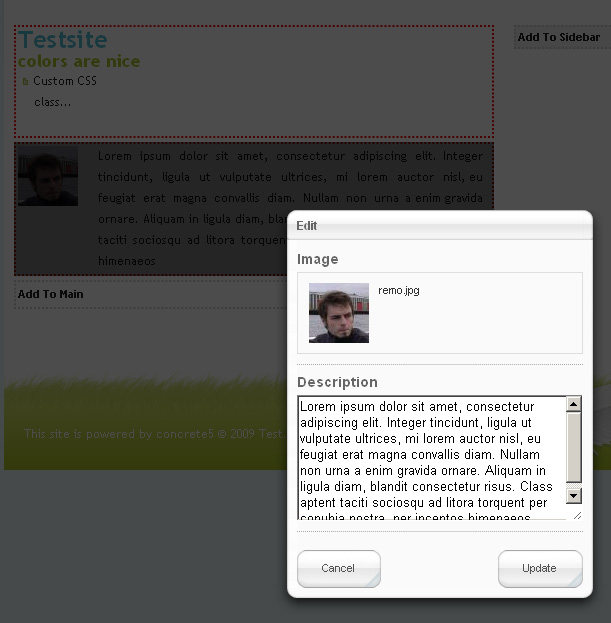
Die HTML Ausgabe sieht folgendermassen aus:
1 2 3 4 5 | <div class="ccm-person"> <div class="ccm-person-image"><img src="http://myserver/remo.jpg" alt=""></div> <div class="ccm-person-description">Lorem ipsum dolor sit ame.</div> <div style="clear:both"></div> </div> |
Bitte beachten, dass ich am Ende eine “inline CSs-Anweisung” eingebaut habe. Dies wenn möglich durch eine Klasse aus dem gewählten Theme ersetzen. Ich hab hier lediglich zu Demonstrationszwecken kein ganzes Theme veröffentlicht, damit der Code kurz und lesbar bleibt.
Ohne weitere CSS-Anweisungen wird der Text unterhalb des Bildes dargestellt. Da wir aber ein zweispaltiges Layout haben wollen, fügen wir unsere CSS Datei aus dem Theme ein paar Zeilen hinzu:
1 2 3 4 5 6 7 8 | .ccm-person-image { float: left; width: 80px; } .ccm-person-description { float: left; width: 385px; } |
Dies muss unter Umständen dem Theme angepasst werden.
Am besten einfach den Block herunterladen und loslegen!
Table layouts
I’m not going into the details about tableless layouts, just a few basic things. The table tag shouldn’t be used for a layout, using div & css is the way to go. With Concrete5 you could theoretically create two areas but you would then have the problem that the content in the left column doesn’t have to same margin to the top as the content in the right.
I’m therefore describing a block that creates a proper div output which you can style using common css rules.
The staff block
The block contains only two elements. A picture and a textfield to enter a little note/description about the person.
The html output will look like this:
1 2 3 4 5 | <div class="ccm-person"> <div class="ccm-person-image"><img src="http://myserver/remo.jpg" alt=""></div> <div class="ccm-person-description">Lorem ipsum dolor sit ame.</div> <div style="clear:both"></div> </div> |
Please note that I’ve added div at the end that uses an inline-style to clear the output. You might want to use a class of your theme but since there’s no class name that’s available everything, I’ve decided to use an inline-style to explain the block!
Without any styling this will generate an output where the text is shown underneath the picture. But since we want to have a table-like layout, we add a few lines to our css file:
1 2 3 4 5 6 7 8 | .ccm-person-image { float: left; width: 80px; } .ccm-person-description { float: left; width: 385px; } |
This is usually specific to your layout, change it to suit your needs!
41 Comments
[…] the original post: Concrete5 – Staff listing with two Columns .adHeadline {font: bold 10pt Arial; text-decoration: underline; color: #3D81EE;} .adText {font: […]
Hey Remo –
Great to see you posted this! This block helped me greatly!
Thank you very much for this! Was exactly what I was looking for.
I know it’s not standard CSS, but I’ve always preferred “display:inline-block” to “float:left”. Mostly because the containing node with scale with it’s content that way, and it works nicely with vertical-align.
I never used “inline-block” because it’s not only not valid but also not very well supported. Firefox 2 doesn’t support it and Internet Explorer up to Version 7.0 has only incomplete support of inline-block… But if it works for you..
Hi Remo,
Im using this cool block of yours but Ive made a few changes. Ive made 3 columns instead of two and I have the persons name in the second column.
So it goes: Image – Name – Description.
Ive even changed the interface so I have another input area called name.
However this new Name field is not showing up in the site. It remains blank.
Ive edited view.php and form.php to achieve this but I suspect I need to edit something else so that it shows on the page.
Is it controller.php?
Sorry for mucking about with it but its a design thing.
Any light you could shed would be much appreciated.
Thanks
Nige
[…] Profile – Based on Remo’s People Block, this block allows you to create a profile for an employee. You can display the employee’s […]
Newbie to Concrete5
This is the block I have been looking for.
I have installed the block but not the CSS code.
What file do I need to add the CSS to get the text to move to the left?
I am reading up on CSS 101.
Thanks.
Why don’t you modify the html code in view.php? Should be a lot easier I think..
[…] Profile – Based on Remo’s People Block, this block allows you to create a profile for an employee. You can display the employee’s […]
Any reason why this block won’t show under “Add Functionality”?
you have to extract this in “blocks” not packages, you also have to make sure the directory “person” is still there!
[…] Profile – Based on Remo’s People Block, this block allows you to create a profile for an employee. You can display the employee’s […]
Hi Remo, I’m a newbie, so this might be a dumb question – where exactly do you specify the css styles? I was expecting to see a css file, or some inline code in your example, but it seems to be a css example without any css?
Ah, ok so if I save it as view.css it automatically gets added to the page – cool! But the layout is a bit screwy – I’ll experiment – thanks for the example!
How would I add a title field to this also? So I can put someones name, job tilte and description?
Sorry am I being dim here I can’t see where to implement the css either. I tried putting it in my style.css but that didn’t work. Have tried to put it at the top of the view.php doc. that doesn’t work. Please explain….
This block is ideal for me, but I really need to have a music player block on the left instead of a photo. Is there any way to make that happen?
CSS can be at the beginning of view.php but you can also create view.css if you want or you can but it in main.css of your theme.. It doesn’t matter where it is as long as it is included..
There’s no problem in using this as a music player. You can use these instructions to replace the img tag with an embedded flash player:
http://wpaudioplayer.com/standalone
How would I go about inserting an email link? I almost always need to put an email link in a person’s bio – in the text and on their photo.
Hallo Remo,
ich möchte einen Bereich auf der Seite in dem alle Blöcke horizontal angeordnet werden. Wie kann ich so einen Bereich am besten erstellen wenn er sich nicht über die gesamte Seite erstrecken darf? Ist es sinnvollerweise ein Block (kann ich überhaupt Blöcke in die Blöcke hinzufügen) oder ist das ein Teil des Themes (aber nicht jeder Seite soll diesen Bereich haben)?
@Cahty: This is rather easy, just add an “a-tag” to the output with “mailto” in front of the value and you’re done..
@Alex: Das geht mit CSS relativ einfach. Einfach eine CSS Regel beim äussersten DIV des Blocks einbauen mit “float: left”. Es kann passieren, dass Concrete5 im Designmodus dadurch ein paar Probleme bekommt, müsste ich aber auch zuerst ausprobieren..
Danke Remo,
die float:left Eigenschaft ist mir bekannt. Dann ist dieser Bereich ein Teil vom Theme und ist auf jeder Seite vorhanden, richtig? Es ist wahrscheinlich nicht schlimm denn ich kann ihn einfach leer lassen.
Beim Erstellen von einer neuen Seite kann man zwischen “Press Release, Seitenleiste links, Seitenleiste rechts und Volle Breite” auswählen – allerdings das Ergebnis sieht irgendwie immer gleich aus – wo ist da genau der Unterschied?
Das neue Layout-System in concrete 5.4 ist genau das was ich brauche – man kann mehrere Blöcke auf der Seite anordnen ohne das man Templates verändern muss.
Alex, nein, die Typen Seitenleiste links, rechts sehen nicht zwingend gleich aus. Wenn du in deinem Theme eine PHP Datei hast, welche mit dem Namen des Seitentyps übereinstimmt, so wird dieses automatisch verwendet. Gibt’s keine passende Datei, wird default.php verwendet. Dies wird wohl in deinem Fall so sein… Versuch mal ein Standard Theme zu verwenden, dann siehst du wie sich die Layouts verändern.
Allerdings hast du recht, das neue Layout System deckt unter Umständen vieles davon ab. Auch dieser Block kann damit problemlos abgebildet werden. Je nach Situtation ist es aber einfacher, wenn man nicht Layouts und Blöcke einfügen muss. Mit diesem Block brauchst du noch immer weniger Klicks…
Beachte auch, dass man in den Seitentyp-Standards keine Layouts vordefinieren kann. Dies soll in der nächsten Version funktionieren, kann aber im Moment noch ziemlich lästig sein!
I have installed the folder “person” in the top level “block” folder.
I’m seeing a scrap of PHP code displayed at the top of the Add Functionality -> Installed and Available page, rather than a “Ready to Install” entry for “person.” Other blocks I have installed show up as “Ready to Install.”
Any thoughts?
The text I see is:
t(‘You must select an image.’) ); } function getFileID() {return $this->fID;} function getFileObject() { return File::getByID($this->fID); } function getDescription() {return $this->description;} } ?>
Eric, this might be because your web server doesn’t allow php short tags.
Try this: Change your configuration or look for <? in every php file and replace it with <?php
You gave me a good start there, thanks! Indeed in the php.ini on my server I see “short_open_tag = Off.” I’m not a PHP programmer, but from what I’ve read, “Off” is what can be expected “from now on.” If so, you might consider updating the files in your download.
Also, doing a blind search and replace on <? does not work. First, at least one of the files in your bundle already uses the long open tag and I ended up with "<?phpphp" in that file! 😉
The next problem took me two or three hours of fiddling and failed research to finally figure out:
In form.php there are lines like
Left as is, when you attempt to add a “person” block, PHP code again bleeds into the process. Now, it appears in the “add” dialog.
It turns out that you certainly do NOT want to convert this to
Looking at the contents of other Concrete5 blocks, I made a guess that somehow “” really meant
When I made *those* sorts of changes also, I finally was actually able to add a “person” block. Oddly, the text entry area is slightly wider than the window, so a bit of the text on the left/right is clipped off. I can either live with that or probably figure it out.
I couldn’t find any PHP documentation that mention anything about how “=” is the same as ” echo ” (I thought the equals sign was an assignment operator.) If you have any pointers to explanations on this, I’d be interested.
Really, this is just a starting point, because I want to generalize the concept you’ve created. (image on the right, image vertically aligned in the middle, etc.) I appreciate your contribution to solving the problem, but I must say I am quite disappointed that a far richer solution isn’t PART OF the default Concrete5 installation. Having text along side an image is hardly an *exotic* requirement!
Thanks,
eo
Hmm. Some of my code snippets were eaten by your blogging software. If you tell my how to avoid this, I’ll try to come back and correct things.
Hey, I am sorry for being offtopic but what theme do you have on this blog? did you create it by yourself? I really like the theme of this blog.
No, I was lazy and used “greenmarine”
Hey, vielen Dank, das ist genau das, was ich bisher nicht gefunden hatte. Ich werde es mir nur so umbauen, dass auch in die linke Spalte Text kommt.
Ich bin noch ziemlich neu in Concrete5 und kann Blöcke bisher noch nicht selber programmieren, aber so was wie dieses kleine Beispiel ist ja immer ein guter Einstieg.
Also vielen Dank.
Hi Remo
This block is great (I’ve edited and used it myself several times), but it doesn’t seem to work on 5.4.1.1 – it doesn’t show up on the Add Functionality page.
Do you have any idea what the problem might be? Please email me if you get a chance!
Regards,
Laurence
Sorry, I was putting it in the wrong place (/packages instead of /blocks)!
Okay, I must be fogged-up today. I have unzipped the archive and uploaded the folder /person to my site’s root/blocks folder so that I have root/blocks/person on the site. But, I’m not seeing the add-on in the “Install Add-on” screen.
Am I missing something? Btw, this is a C5 5.4.2.2 site.
Thanks for any help provided.
Regards,
Chris
Hi Chris, I don’t see anything wrong with what you describe. As long as you have /blocks/person/controller.php you should be fine. There might be a cache problem or something, but I never had any issues here! Have you tried this on multiple sites?
Remo
Remo -I am a newbie to c5 and php. I just discovered your block – I would like to add a php calendar scheduler into your block. any suggestions. thanks
Depending on what you’re actually trying to do, this could be a lot of work. I’m thinking about reoccurring appointments, a fancy AJAX interface etc. etc. To give you a more precise answer, I’d need to know a bit more about the details..
But anyways, I’d start by get familiar with with the datepicker, it might be what you need to ask the user for a date:
Remo,
This is a great block that I have used on a previous site that we inherited. I am trying to install it on a new site that is in development. It is not showing up. I have unzipped the files and placed them in
httpdocs/blocks/person – am I missing something?
Happy New Year.
John
Hi John,
it’s a bit difficult to know why the block doesn’t show up without an error message or something that tells me what’s wrong.
There’s a general rule I usually follow: When developing a new site, always disable the caches. Just type “cache” in the intelligent search box and select the cache settings screen. Try to disable all of them and check if that changes anything.
Happy New Year too!
Remo
Remo,
I have disabled the cache and the add-on is still not showing up to be installed…I am really feeling dumb right now. I must be missing something.I have placed it in the httpdocs/blocks/person.
Should it be in the concrete/blocks directory
John
never mind…just found it – under block types in the dashboard. I was looking for it un add functionality….
sorry to have bothered you. Thanks again for the great block.
John