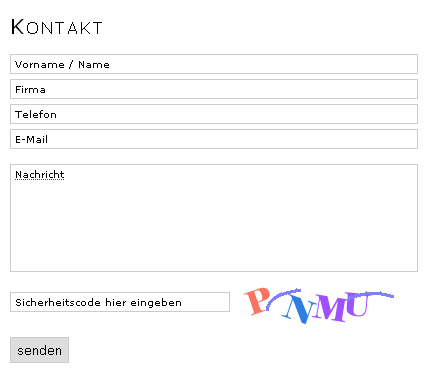
Concrete5 has a nice form block which allows you to create a contact form within a few seconds. You don’t even need to have any html or php skills to create a simple file upload form. Unfortunately this block isn’t very easy to style. It uses some html markup which makes it a bit tricky to use CSS. However, it doesn’t mean it’s impossible! I’m going to show you how you can easily create a styles form using Concrete5 Custom Templates to produce this:
Custom Templates
If you don’t know anything about “Custom Templates”, you should probably read this article first: http://www.codeblog.ch/2009/03/concrete5-templates/. In short: Concrete5 allows you to style any block using templates in case you need to change the html output and not only the css rules.
Core modification
There’s one small thing I didn’t want to modify in the custom template since it shouldn’t be printed anyways. This might change in a future version, but because it doesn’t break anything I’m going to make the “not recommendable” core change in this case. Open the file “concrete/blocks/form/controller.php” and go to line 667 as shown on this screenshot:

Remove ‘style=”width:95%”‘ as it makes css styling a bit nasty. Please note that this step isn’t necessary, it’s just about the layout!
The default layout
If you create a new form, it usually looks like this:
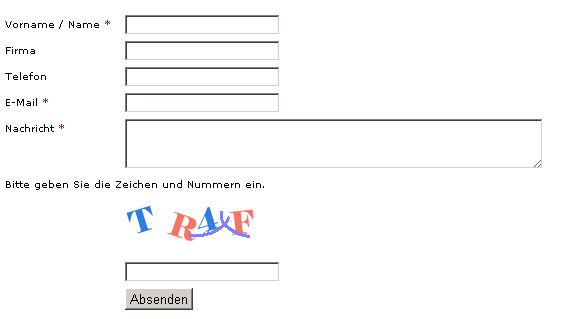
It works but doesn’t look very nice.
New form style
In this tutorial I’m showing you how you can create a form in which the labels are in the textfields and not on top or left. This might especially be useful if you have a very small page and a huge form. It also looks nice.
This is how the result is going to look like:
Let me start with the php template view.php:
1 2 3 4 5 6 7 8 9 10 11 12 13 14 15 16 17 18 19 20 21 22 23 24 25 26 27 28 29 30 31 32 33 34 35 36 37 38 39 40 41 42 43 44 45 46 47 48 49 50 51 52 53 54 55 56 57 58 59 60 61 62 63 64 65 66 67 68 69 70 71 72 73 74 75 76 77 78 79 80 81 82 | <?php defined('C5_EXECUTE') or die(_("Access Denied.")); $survey=$controller; $miniSurvey=new MiniSurvey($b); $miniSurvey->frontEndMode=true; ?> <div class="ccm-form" id="ccm-form-id-<?php echo intval($bID)?>"> <?php if ($invalidIP) { ?> <div class="ccm-error"> <?php echo $invalidIP?> </div> <?php } ?> <form enctype="multipart/form-data" id="miniSurveyView<?php echo intval($bID)?>" class="miniSurveyView" method="post" action="<?php echo $this->action('submit_form')?>"> <?php if( $_GET['surveySuccess'] && $_GET['qsid']==intval($survey->questionSetId) ){ ?> <div id="msg"><?php echo $survey->thankyouMsg ?></div> <?php }elseif(strlen($formResponse)){ ?> <div id="msg"> <?php echo $formResponse ?> <?php if(is_array($errors) && count($errors)) foreach($errors as $error){ echo ' <div class="error">'.$error.'</div> '; } ?></div> <?php } ?> <input name="qsID" type="hidden" value="<?php echo intval($survey->questionSetId)?>" /> <input name="pURI" type="hidden" value="<?php echo $pURI ?>" /> <?php $questionsRS = $miniSurvey->loadQuestions($survey->questionSetId, intval($bID), 0); $surveyBlockInfo = $miniSurvey->getMiniSurveyBlockInfoByQuestionId($survey->questionSetId,intval($bID)); $showEdit = false; $hideQIDs=array(); while($questionRow=$questionsRS->fetchRow()) { if(in_array($questionRow['qID'], $hideQIDs)) continue; $msqID=intval($questionRow['msqID']); $requiredClass=($questionRow['required'])?' required ':''; $requiredSymbol=($questionRow['required'])?' *':''; echo ' <div class="ccm-form-element'.$requiredClass.'">'; $_REQUEST['Question'.$msqID] = $questionRow['question'] . $requiredSymbol; echo $miniSurvey->loadInputType($questionRow,showEdit); echo "</div> "; } if($surveyBlockInfo['displayCaptcha']) { $captcha = Loader::helper('validation/captcha'); echo " <div class=\"ccm-form-captcha\">"; echo ' <div class="required">'; echo '<input type="text" value="Sicherheitscode hier eingeben" name="ccmCaptchaCode" class="ccm-input-captcha"/>'; // Please note that we need to style our captcha, we therefore create it manually! //$captcha->showInput(); echo "</div> "; echo " <div>"; $captcha->display(); echo "</div> "; echo "</div> "; echo ' <div style="clear:both"></div> '; } echo '<input class="formBlockSubmitButton button" name="Submit" type="submit" value="senden" />'; ?> </form></div> |
I’m not explaing each line because I assume you understand PHP, otherwise this tutorial isn’t made for you – sorry!
What I changed:
- Calling some methods found in the controller out of the view
- Created a div layout instead of a table layout
- Added some CSS classes to indicate required fields
- Added a strange line which makes sure that the value attribute of the textfield contain the description
Now, we’ve got a form where we don’t have any labels next to the input fields. But we need to get rid of these values at some point, otherwise the users are able to submit forms using the default values (labels). To achieve this, we’re going to use some JavaScript checks:
1 2 3 | $('.miniSurveyView input[type=text], textarea').click(onEnterField); $('.miniSurveyView input[type=text], textarea').focus(onEnterField); $('.miniSurveyView input[type=text], textarea').blur(onLeaveField); |
These events get raised once a users clicks into a textfield within our form. There we check whether we have to replace the label or not using this code:
1 2 3 4 5 6 7 8 9 10 11 12 13 | function onEnterField() { if ($(this).attr('origLabel') == null) $(this).attr('origLabel', $(this).val()); if ($(this).attr('origLabel') == null || $(this).attr('origLabel') == this.value) $(this).val(""); $(this).prev(".formError").slideUp(); } function onLeaveField() { if ($(this).val() == '' && $(this).attr('origLabel') != null) $(this).val($(this).attr('origLabel')); } |
We also add some client side checks to make sure the users has entered all the required fields. This allows us to safe a request and a few milliseconds of waiting.
$(document).ready(function() { $('.miniSurveyView input[type=text], textarea').click(onEnterField); $('.miniSurveyView input[type=text], textarea').focus(onEnterField); $('.miniSurveyView input[type=text], textarea').blur(onLeaveField); $('.miniSurveyView').submit(function() { var formErrors = 0; $('.formError').remove(); $('input[type=text], textarea', this).each(function() { if (($(this).attr('origLabel') == undefined || $(this).val() == $(this).attr('origLabel')) && $(this).parent().hasClass("required")) { formErrors++; $(this).before(' <div class="formError" id="formError'+formErrors+'" style="height:18px;color:red;font-size:10px;display:none;">Bitte Wert eingeben:</div> ') $("#formError" + formErrors).slideDown(200,function() { }); } }) if (formErrors > 0) return false; else return true; }) }); |
We check for all fields and make sure the have a value in case they’re underneath a div with the class “required”. We simply display a div above the input fields in case there’s a value missing.
The template also contains some css rules which I’m not going to show in this article. They’re pretty straight forward, but you can also find them here:
Extract the zip into “blocks/form/templates”. You might have to create the diretories form and templates first!
Enjoy!
48 Comments
Thanks Remo – this is so helpful. As always!
The send button reads “senden” which I changed to English “Send” in view.php, line 66
Also there was some German in the view.js file, line 29. I changed this to English “Please enter a value” .
Is that OK?
$(this).before(‘Bitte Wert eingeben:’)
Yes of course. I should have made those “translatable” but since block translations aren’t well supported in Concrete5 I tend to use the language I need without using gettext..
Hi Remo,
The drop down list selector doesnt display properly – the field title disappears and the width is not justified with the other fields. How do I fix this?
This is most likely a css issue. I think I missed the “select” element. When you look at the css you see a rule which starts like this:
.ccm-form-element input {
Modify it to:
.ccm-form-element input, .ccm-form-element select {
I haven’t tested it – send me a link if it doesn’t work.
Hi Remo,
Thanks for your responses.
I modified the css as you specified above. The url is;
http://www.espmasia.com/index,php/en/people/careers
3 issues;
1. The title for the Attachment field and Expertise drop down menu are not displaying.
2. Input id= > validator says there is no value specified
3. ampersand issue highlighted by validator
INPUT ID ISSUE
For the div corresponding to the field to browse for and attach a form, the validator highlighted:
143 E622 The ‘id’ attribute does not have a valid value: It does not contain a valid ID. It must begin with a letter, underscore or colon and may be followed by any number of letters, digits [0-9], hyphens,underscores, colons, and periods:
143
Firebug confirms:
What should this “input id” be and where do I write it?
AMPERSAND ISSUE (on last line of snippet)
139 E007 Found ‘&’ within ‘action’. You should use ‘&’ instead:
I looked in all the associated “view” files but couldnt find where this “&” is coming from.
I’m not very familiar with php and search and trawl forums for quite a while before I resort to asking you so I appreciate your patience. I’ll post your solutions in the W3C Valid thread on the C5 bug tracker forum (http://www.concrete5.org/index.php?cID=1473)
For some reason the complete code that I copy/pasted is not displaying. (also other posts) You’ll see when you run the validator on the page
1. see comment above, you need to add some more css rules
2. not sure, have to check this
3. this isn’t related to template but has been fixed a while ago as far as I know. Are you using the latest c5 version?
Anyone managed to get this to direct the user to a new page when they complete the form?
Big thanks for this posting, just set it up and it looks great!
Thanks Ryan,
it’s not that difficult to display a different page but you have to modify a couple of lines in the sourcecode, take a look at this discussion http://www.concrete5.org/community/forums/usage/display-thank-you-page-after-user-submits-form/
Cant seem to get this to install on the latest version of C5, any ideas of a work around?
hey Eyan,
don´t erase ’style=”width:95%”‘ just change it to ’style=”none”‘ and it will work with the latest version!
Sorry i meant Ryan
Thanks for the help guys, used this a few times now, you should submit it to the Marketplace.
Nice tutorial!
I’m having problems with error checking. I modified the submit button to be replaced with a custom imaged anchor:
echo ‘
Ilmoittaudu!‘;
The button works fine, but submits without error checking, showing thank you message after each submit. If I try with the original button, the error checking JS doesn’t work anyway. Otherwise inputfield scripts work fine!
Would anyone have a thought where to spot this bug?
in function onLeaveField() the last line has to be
this.origLabel = null;
otherwise it will only work once.
Great work done! Keep that going on 🙂
Hi again!
Why Im I having these problem with error checking?
With the original JS it founds no erros ever.
If I replace “this.origLabel = null;” in function onLeaveField() with
“this.value = this.origLabel; ” clear field upon click only once. So if I don’t click them, it founds to errors with them. And also if it founds errors, the fields are cleared…
If I just add “this.origLabel = null;” after “this.value = this.origLabel; ” I found no change in the workings.
Sorry. I’m no coder with JS… But it seems this code is nowhere near complete, or for some reason it works differently for me as I modified the submit work by:
onclick=”this.blur(); document.getElementById(‘. “‘miniSurveyView”.intval($bID).”‘”.’).submit();
Thanks o lot for this !!! A real timesaver.
One Question: Should it work in IE6 ?
Every text field is working except for the Captcha input form.
Or is there any other Problem with my Html/Css?
thanks again, greets
I can’t see any reasons why there should be an IE6 specific issue but I only have a browser museum at work. Do you get any error messages? I’m sure we can fix that if you could post a few more details at http://www.concrete5.ch
thanx for your reply. I´ll try to figure this out. There aren´t any error messages, it isn´t clickable, you can´t write in this field. Perhaps theres a problem with my css? I´ll write the solution in this place or the more details if i cant fix it at concrete5.ch.
Greets, thx
Hello again, it was NO problem with this code. It was a weird problem with transparent png´s and js. Damn IE 🙂
I have so
“Access Denied.”
http://www.wiyono.de/komen/view.php
what i have to do?
Why are you trying to call view.php directly? It’s a block template, you have to select it while you’re in the edit mode of the page where the form block can be found. Click on the block and select “Custom Template” and pick the new template from the list. I Concrete5 everything goes through index.php, you’re not supposed to open php file directly.
The Javascript file doesn’t seem to work at all. I couldn’t even get an alert to call from within any of the functions. Also the first few if statements don’t have brackets around the function. Where does it go? I was also unable to get the CSS file to work until I moved it up one level out of the templates folder.
The JavaScript file looks fine to me. If you can’t even use an alert command to display a message there has to be a JavaScript error in the console! Please check that.
Also, you don’t need to have any brackets if there’s just one line of command to execute.
Did you see that there’s a link to download the complete code at the end of the article?
Ok fixed everything from my old comment. Looks like the .css and .js files need to be put into a ‘CSS’ and ‘JS’ directory respectively within the blocks/form/templates/yourTemplate/
Hi Remo,
I have problems with your excellent template on new version of C5 (5.4.2.1. – jQuery Form plugin is updated to 2.82. ).
Text fields do not recognize input (error: Bitte Wert eingeben:). E-mail field is OK (see attached web address).
Thanks for the help in advance.
Btw: Congs. on the book.
Hi Tom,
I’m not sure about the code you’ve created, it seems that you’re using a HTML5 form type but don’t use the correct doctype.
Also, why did you update the jQuery form plugin? The template I’ve created doesn’t use that plugin?!
Thanks,
Remo
Hi,
I’m sorry for misunderstandings.
I was pointing out that version of jquery (2.82) is built in new installation of Concrete5 (5.4.2.x). On the test site (as you can see – with core page templates), your e-mail template is also ‘virgin’, without any modifications.
Thanks for quick answers.
Tom
Hi Remo,
This is brilliant, works perfectly.
Just one issue.
The drop down select does not show the label inside the field.
Here’s what firebug shows.
—-
URL : http://www.zambeel.ca/testc/10peaks/index.php/contact
Any guidance appreciated.
I’m not really sure I can show a label for a drop down, have you seen any example where that works? I could display a completely different element on top of it but that would take quite a bit more time..
Hi!
This is a great template and thanks for the tutorial and the work, especially the styling in German! I would like to incorporate the Ajax form into this template and can’t seem to get the curve. Could you help me there?
Also, when I used the Captcha in Concrete5.5.0, the message “Please enter the security code” is not replaced by the German in the template. Is there a change there that I could easily correct?
What are you problems with incorporating this into your template? Any error messages? It’s a bit difficult to help you without any further information!
This tutorial has been written a while ago, I never had the chance to test it with 5.5.x but I’ll try to do this as soon as possible!
Update: I just checked this very, I can only see one text in English “Click the image to see another captcha.” But this is because this string is taken from the core and since my concrete5 site is running without the German translations, it will only pick up the strings I hardcoded in the template. If I’d take the translation from this site, the last English string would be translated as well: http://mygengo.com/string/p/concrete5-1
Just want to say what great work you do and great support for all the things you have created! I am having a problem using the template in 5.5.x. Entering in a ‘Text Field’, I get the error message ‘Bitte Wert eingeben:’. I have used the form without the template with exactly the same text and the message goes through einbahnfrei. I really like the styling of your template and don’t feel like reinventing the wheel. Is there a quick fix to make the template work with 5.5.x? Thanks!
Thanks Sarah! Unfortunately I didn’t have time to look into this, I currently do not even have a test site to check it out but it’s on my todo list!
Hi Sarah, I just installed my template on a fresh 5.5.2 site and added two text fields. Seems to work just fine!
Would it be possible that I can look at the problem myself? Maybe a playground site of yours where I can play around?
Thanks!
Hey Remo, here is a test page where I get the “Bitte Wert eingeben” message. Maybe you can see what I am doing wrong.
Thanks Sarah! The problems occurs because my templates assumes that the jQuery library is included in the theme. I think concrete5 before v5.5 made sure of that but that’s changed. It’s usually a good things as you want to avoid loading unnecessary resources into your page but in this case it would be better. Did you create that theme on your own? Do you know how to include jQuery? (Basically load this external JavaScript : /concrete/js/jquery.js)
In Firebug, it looks like the Jquery is loading
[code]
var CCM_SECURITY_TOKEN = ‘1333965454:32581a0092cb7758e706ed53bcd3e2f1’;
[/code]
And I don’t get any errors in Firebug but still the error message when I try to complete the form. I did create the theme myself but I don’t have jquery conflict issues with other addons. I am sorry to put you to so much trouble. I am not especially schooled in these things and maybe this is more trouble than it is worth for you. Thanks so much for your help so far.
Sorry, the important line didn’t show up.
In Firebug I see this
which means jquery is loaded, right?
Sarah, it seems like you’re using an version of my template. Have a look at the method “onEnterField” in my article and compare it to yours http://www.janicedixon.com/blocks/form/templates/german_form/view.js
Hey Remo, you are the best! I changed a couple things for languages and apparently made some changes in the java without realizing it. I reloaded the zip and everything works perfectly now! Thanks so much for taking the time and also for writing such great tutorials!
is there a way to display the upload and the drop down questions ?
And is there a way to change the size of the date ?
Styling file upload fields is a bit tricky. I wouldn’t recommend to do that from scratch. There are plenty of libraries out there you can easily integrate, here’s one example I just found on google: https://github.com/emblematiq/Niceforms
I know that this form is pretty old but it is still one of the best things out there! I have however been struggling for hours to get the radio buttons to appear display:inline and not having any success. I have tried lots of things but nothing seems to work. Could you please give me a tip where I can change how they appear? Thanks
Radio buttons are a bit annoying to style, you basically have to get rid of the button itself and move something on top of it, here’s a nice example http://jsfiddle.net/heZBT/
For those who need the question in for drop down lists. This is what I did. In my case it’s ok.
add the following to view.css
.ccm-form-element select{
fl/oat: left;
width: 200px;
display: block;
margin-bottom: 5px;
}
.ccm-form-label-select{
b/ackground: red;
float: left;
width :200px;
font-size: 0.85em;
padding-top: 0.15em;
}
and in view.php after line 34: if(in_array($questionRow[‘qID’], $hideQIDs)) continue;
add this:
if($questionRow[‘inputType’] == ‘select’){
echo ” . $questionRow[‘question’] . ”;
}
Thanks! Didn’t think anyone would use this dinosaur anymore 😉