Blog


No Network in Debian after Cloning with VirtualBox

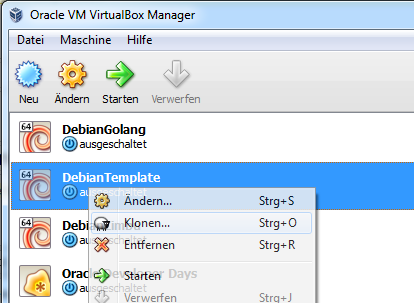
I often work with virtual Debian instances to test new stuff. In order to reduce the likelihood that another test I’ve run before interferes with the new test, I clone them. I’ve installed a base system which runs using VirtualBox. Whenever I want to test something new I just clone it with this neat little function:

Unfortunately there’s one little change you have to make…


Statically linked Linux executables with Go


You might have seen my previous article about creating executables without dependencies http://www.codeblog.ch/2011/06/statically-linked-linux-executables/. While I still try to focus on Oracle and concrete5, there’s often a situation where I have to build a small, portable and fast tool. I didn’t look at something specific, I rather tried several solutions and now it’s time to add another language to this list.

Google created Go a while ago and released version 1.0 at the end of March 2012. Some might wonder why Google created yet another new language. You can find the official answer here: http://golang.org/doc/go_faq.html#What_is_the_purpose_of_the_project. To me the most important things worth mentioning are:

  • Fully garbage-collected
  • Support for concurrent execution and communication
  • Doesn’t need a virtual machine like JRE
  • Construction of system software on multicore machines

This doesn’t mean that Go is restricted to those things, you does a lot more but when comparing it to Java and other languages, these are a few major points of interest. I’ve run my experiment on a freshly installed Debian 6.0 operating system. My favourite distribution as it’s small and efficient, I can’t give you instructions for Fedora and other system but if you’re familiar with some of the basic libraries for your distribution, it shouldn’t be too difficult to get Go up and running.


concrete5 – Custom Toolbar Button

with concrete5 you usually put your add-on code in a package and don’t touch the core. This concept allows you to update the CMS core without overriding anything you’ve built on your own. In order to interact with the CMS you can use several functions helping you to integrate your add-on into the CMS interface.

In this short article we’re going to look at a simple example which will place a button next to the edit button and shows a dialog with a quote. Nothing fancy, just an example aimed at developers who want to use this feature in their add-ons.

This is how your button is going to look like:


concrete5 SooperFish drop down navigation

Creating a drop down navigation is an old technique by now but it’s still used in a lot of cases to hide parts of a navigation. In addition to the plain CSS menu I wrote more than 2 years ago, I decided to write a new tutorial which uses JavaScript as well. You might ask why: Avoiding JavaScript is nice but creating something as complex as a drop down navigation without any JavaScript leads to a few ugly work arounds. You’ll also have some difficulties to add a fade out and fade in effect unless you’re using CSS3 which isn’t well supported yet.

But at the end it’s up to you, both solutions can work just fine!

Using SooperFish is also a bit easier for us, you’ll see at the end of the tutorial how little code you needed.
At the end your navigation can look like this:


concrete5 – improving performance by adding favicon.ico

Most browsers are looking for that little favicon to display a 16×16 icon next to the URL in the address bar. How does this work? There are two main ways:

  • They check if a file is available at /favicon.ico
  • They check if a proper link tag has been set:<link rel="shortcut icon"
    href="http://www.oraclerecipes.com/oraclerecipesicon.ico" />

But what happens if you don’t do anything of the above? The browser will still try to search for favicon.ico. While you don’t even see that when you open your browsers console, the webserver will notice that. If you check your webservers log file, you’ll find something like this:

www.oraclerecipes.com 88.222.33.111 - - [04/Sep/2011:08:09:23 +0200] "GET /favicon.ico HTTP/1.1" 404 751 "-" "Mozilla/5.0 (Windows NT 6.1; WOW64) AppleWebKit/535.1 (KHTML, like Gecko) Chrome/13.0.782.220 Safari/535.1"

The concrete5 URL rewriting rules check if the requested path is a static file but since it doesn’t exist, the request is forwarded to the dispatcher. This means that concrete5 will search through its database to see if there’s a concrete5 page available at /favicon.ico but obviously won’t return anything else but “Page not found”. This database lookup can easily consume 100ms which isn’t a lot but assuming you’ve got a busy site, this is probably still something you’d like to get rid!


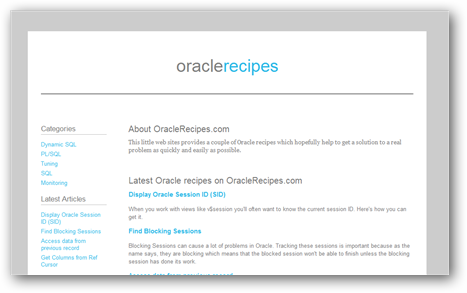
Oracle Recipes

Despite the fact that most articles on this blog are about concrete5, I mostly work with Oracle and ERP applications with Oracle in the back. In my daily work with Oracle, I often find myself doing more or less the same tasks and sometimes I just want to get that script I wrote a decade ago to finish the task.

It’s mostly for myself to organize some of my Oracle information but it might get helpful for other people as well.

There’s not much going on yet but I still launched the site to get some feedback as soon as possible. Check out my new site

http://www.OracleRecipes.com/.


concrete5 – AJAX Add-on to display File Download Statistics

Today’s article is about concrete5 again after a long time without anything about concrete5 on codeblog.ch. The example we’re going to look at takes a few ideas and code snippets from my book about concrete5.

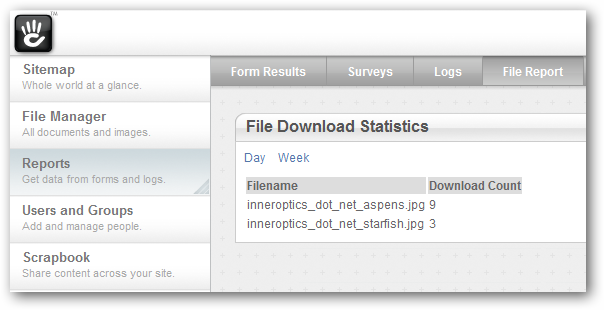
If you ever had a closer look at the file manager you’ve probably seen that if you open the file properties, you can see a small statistics about the downloads of a file. This is quite nice but what if you wanted to see how many file downloads there are in total? Right now, there’s no such report available in concrete5 which is why we’re going to build the first part of such an addon.

It will use some AJAX to switch between different views, allowing us to extend it even further in the future. At the end you’ll have an additional page in the reports section like this:


Statically linked Linux executables with GCJ, Seed7 and haXe

While some of you might try to avoid statically linked executables, they can be quite handy. In my case there are situations where I quickly have to run some code on a shared hosting with limited access. Installing libraries isn’t possible but running binaries is – at least if you have something like SSH access like I mostly do.

The exact reasons why I don’t run a PHP, Ruby or Python script are a bit more difficult. Just believe me that I needed a binary file without the ability to install any additional libraries 😉

To do this, I toyed around with a bunch of different languages. This list is certainly not complete but I’m happy to extend it if you have any suggestions. Please note, I didn’t include languages like C intentionally because I also didn’t want to see things like malloc in my code. At this point you probably think that I’m a rather complicated person and yes, you’re probably quite right about that.

Enough about that, the first languages/compilers I’ve had a look at on my Debian box if you following the link..


concrete5 – Performance Improvement with Block-Cache

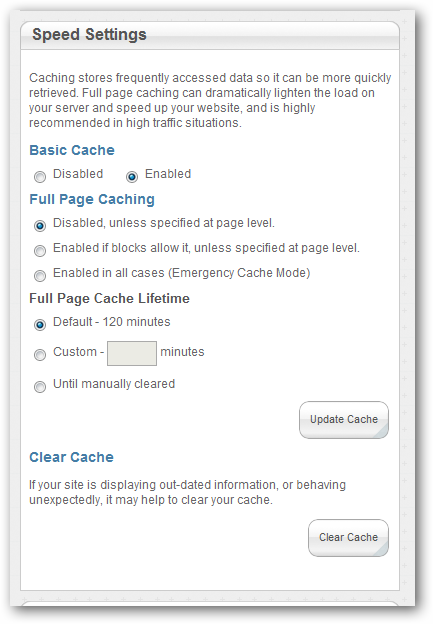
There has been an interesting feature in concrete5 which can improve your sites performance noticeably. If you log in to your site and look at the Sitewide Settings screen, you can see this box:

concrete5 full page cache settings

As already mentioned on the screenshot, these settings improve the performance by caching various outputs generated by blocks. In order to get the most out of your own blocks, you should look into this feature a bit closer. Think about this: How does concrete5 know that the output of a block can be cached? It can’t!

Block Cache Options

If you already created your own blocks in the past, your should be familiar with the BlockController. You probably also specified properties like $btTable and $btInterfaceWidth. Now, there are a few more properties you can set. Look at the following start of a BlockController:

class MusicBlockController extends BlockController {
   protected $btInterfaceWidth = 450;
   protected $btInterfaceHeight = 430;
   protected $btTable = 'btMusicPlayer';
   protected $btCacheBlockRecord = true;
   protected $btCacheBlockOutput = true;
   protected $btCacheBlockOutputOnPost = true;
   protected $btCacheBlockOutputForRegisteredUsers = true;
   protected $btCacheBlockOutputLifetime = 60*30; // 30 minutes

There are a number of variables starting with btCache. All of them are related to the new cache functionality of concrete5. They let you specify if the content changes once a user is logged in ($btCacheBlockOutputForRegisteredUsers) they let you tell concrete5 if the content stays the same if the page is opened using the POST method allowing the cache to be enabled during a form post too ($btCacheBlockOutputOnPost).

You probably won’t be able to measure a huge impact if you’re block doesn’t have to process lots of data in order to print the output. But if there’s a complex method in the background of your block you can use these variables to easily control the cache of the output making your site feel faster.


Remote Lock Computer

If you work at home using remote control tools you might have had troubles accessing your computer if the connection has been dropped. Some remote control tools like RDP or Unicenter Remote Control will only allow you to access the computer if it’s locked. Something which usually makes sense but can be annoying if you lose the connection or if the remote control tool crashes.

There are some VB Scripts out there which you can use to lock the computer from another computer. They work but aren’t really nice as the have to copy a file to the computer you’re trying to lock. You also don’t have a nice interface and sometimes you even have to create some files manually. Not really userfriendly, something which might annoy you – especially if you just lost your internet connection.
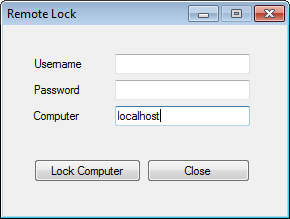
I did some quick work and came up with a rather small C# tool which uses WMI to execute a remote command. There’s a command you can execute to lock your local computer, just hit Windows+R (or click on Start and select Run) and enter this command:

rundll32 user32.dll,LockWorkStation

Once it has been executed, your computer will be locked and ready for remote access. I only created a small interface which combines WMI and this rundll32 command to make the process of locking a computer in your network a bit easier. Please note, you’ll need plenty of permissions. I’m not 100% sure but I think the impersonate option I’m using will only work if you’re a domain admin. Enough talking, here’s the code:

using System;
using System.Windows.Forms;
using System.Management;
 
namespace RemoteLock
{
    public partial class MainForm : Form
    {
        public MainForm()
        {
            InitializeComponent();
        }
 
        private void btnClose_Click(object sender, EventArgs e)
        {
            Application.Exit();
        }
 
        private void btnLock_Click(object sender, EventArgs e)
        {
            ConnectionOptions connOptions = new ConnectionOptions();
            connOptions.Impersonation = ImpersonationLevel.Impersonate;
 
            if (txtUsername.Text != String.Empty && txtPassword.Text != String.Empty)
            {
                connOptions.Username = txtUsername.Text;
                connOptions.Password = txtPassword.Text;
            }
            connOptions.EnablePrivileges = true;
 
            ManagementScope managementScope = new ManagementScope(String.Format(@"\\{0}\ROOT\CIMV2", txtComputer.Text), connOptions);
            managementScope.Connect();
 
            ObjectGetOptions objectGetOptions = new ObjectGetOptions();
            ManagementPath managementPath = new ManagementPath("Win32_Process");
            ManagementClass processClass = new ManagementClass(managementScope, managementPath, objectGetOptions);
 
            ManagementBaseObject inParameters = processClass.GetMethodParameters("Create");
 
            inParameters["CommandLine"] = @"rundll32 user32.dll,LockWorkStation";
            ManagementBaseObject outParameters = processClass.InvokeMethod("Create", inParameters, null);
 
            MessageBox.Show("WMI process created, return value: " + outParameters["returnValue"]);
        }
    }
}

The project should compile just fine if you open the sln file using the free Microsoft Visual C# Express 2010 edition. There’s a binary file in the zip file for those who don’t have the time or interest to compile the project on their own. The code is free, improve it, copy it, trash it.. I’d only appreciate if I’d get some credits for it!

Download RemoteLock