Ein Concrete5 Template erstellen
Es gibt verschiedene Möglichkeiten ein Bild einzubauen. Man könnte ein Bild mit dem Namen der Seite abspeichern und es mit einem kleinen PHP Script einbinden. Was aber wenn der Name der Seite geändert werden soll? Wir nehmen uns deswegen Seiten-Attribute (“Page Attributes”) zur Hilfe.
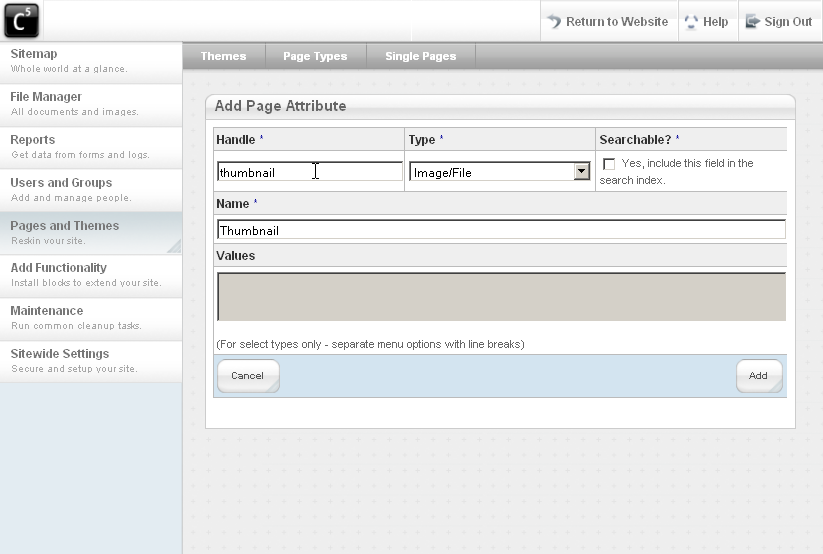
Als erstes müssen wir deshalb ein neues Attribut erstellen, um unser Vorschaubild mit einer Seite verknüpfen zu können (Pages and Themes – Page Types):
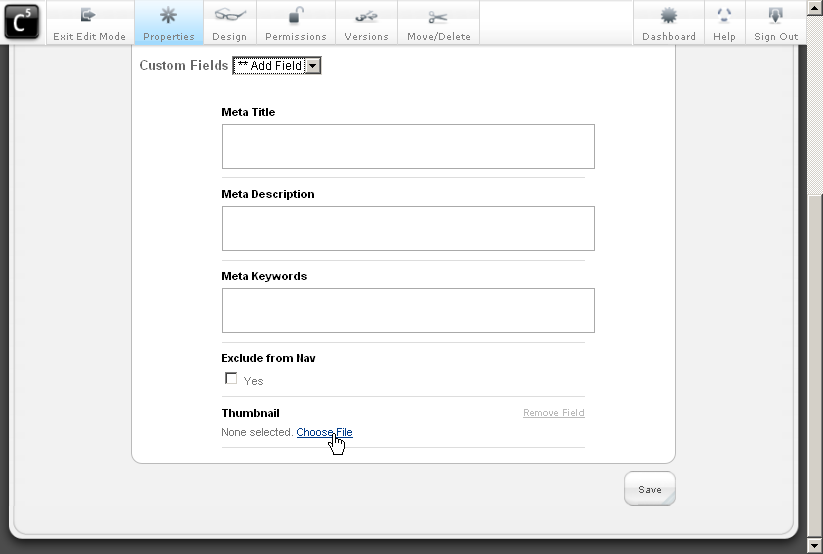
Als nächstes navigieren wir zur Seite, wo wir das Vorschaubild einfügen wollen. Die Seite bearbeiten und die Eigenschaften “Properties” öffnen. Aus der Auswahlliste “Custom Fields” das neu erstellte Feld aktivieren und ein passendes Bild suchen and auswählen:
Anschliessend geht’s ans Programmieren. Als Ausgangslage ist es meistens am einfachsten, den bestehenden “View” eines Blocks zu nehmen. Wir kopieren also den Inhalt der Datei “/concrete/blocks/page_list/view.php”. Wir speichern unsere Datei im Ordner “/blocks/page_list/templates/thumbnail.php”. Die Ordner existieren noch nicht, sie müssen zuerst angelegt werden.
Und hier ist auch schon das fertige Template:
1 2 3 4 5 6 7 8 9 10 11 12 13 14 15 16 17 18 19 20 21 22 23 24 25 26 27 28 29 30 31 32 33 34 35 36 37 38 39 | <?php defined('C5_EXECUTE') or die(_("Access Denied.")); $textHelper = Loader::helper("text"); // now that we're in the specialized content file for this block type, // we'll include this block type's class, and pass the block to it, and get // the content if (count($cArray) > 0) { ?> <div class="ccm-page-list"> <?php for ($i = 0; $i < count($cArray); $i++ ) { $cobj = $cArray[$i]; $title = $cobj->getCollectionName(); ?> <h3><a href="<?php echo $nh->getLinkToCollection($cobj)?>"><?php echo $title?></a></h3> <div class="ccm-page-list-description"> <div class="ccm-page-list-thumbnail"> <img src="<?php echo $cobj->getAttribute('thumbnail')->getFileRelativePath() ?>" alt="<?php echo $title ?>"/></div> <?php if(!$controller->truncateSummaries){ echo $cobj->getCollectionDescription(); }else{ echo $textHelper->shortText($cobj->getCollectionDescription(),$controller->truncateChars); } ?></div> <?php } if(!$previewMode && $controller->rss) { $btID = $b->getBlockTypeID(); $bt = BlockType::getByID($btID); $uh = Loader::helper('concrete/urls'); $rssUrl = $controller->getRssUrl($b); ?> <div class="rssIcon"> <a href="<?php echo $rssUrl?>" target="_blank"><img src="<?php echo $uh->getBlockTypeAssetsURL($bt)?>/rss.png" width="14" height="14" /></a></div> <link href="<?php echo $rssUrl?>" rel="alternate" type="application/rss+xml" title="<?php echo $controller->rssTitle?>" /> <?php } ?></div> <?php } ?> |
Lediglich die Zeilen 18-20 sind neu, der Rest ist identisch mit der ursprünglichen Datei!
Die foreach-Schlaufe liefert uns jeweils ein Page Objekt zurück, von wo wir mittels getAttribute ein Seitenattribute auslesen können. Da unser Attribute nicht nur ein simples Textfeld ist, sondern auch Bild, müssen wir noch mit der Methode getFileRelativePath den Pfad auslesen.
Anschliessend müssen wir nochmals zur Seite “Liste” und das neu erstellte Template auswählen:
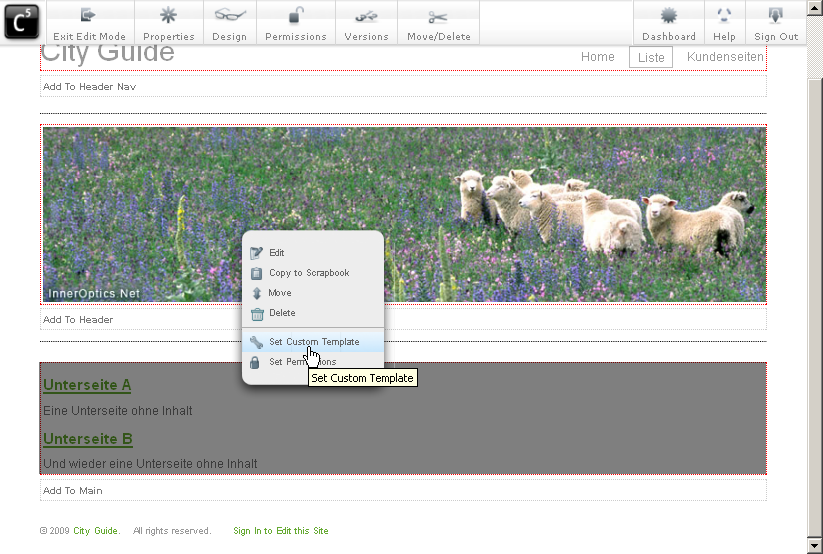
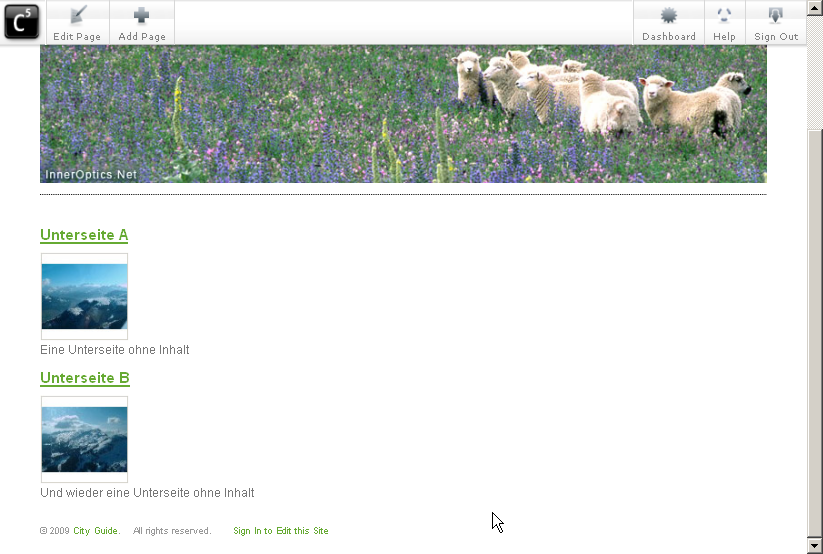
Und schon sind wir fertig – das Ergebnis:
Ein paar Zusatzfunktionen (Update: 11. März 2009)
Eigentlich sind wir ja schon am Ende, aber um noch ein kleines aber leistungsfähiges Feature zu zeigen, hab ich noch eine kleine Anpassung vorgenommen. Im folgenden Template ist eine kleine Prüfung hinzugekommen, die das Thumbnail ausblendet, wenn keines ausgewählt ist. Dadurch wird die Sache etwas solider.
Zudem hab ich die Ausgabe etwas angepasst. Neu wird das Bild mittels “getThumbnail(100,100)”. Dadurch wird ein Thumbnail anstelle des Originalbildes ausgeben, das maximal 100 Pixel breit und hoch ist.
1 2 3 4 5 6 7 8 9 10 11 12 13 14 15 16 17 18 19 20 21 22 23 24 25 26 27 28 29 30 31 32 33 34 35 36 37 38 39 40 41 | <?php defined('C5_EXECUTE') or die(_("Access Denied.")); $textHelper = Loader::helper("text"); // now that we're in the specialized content file for this block type, // we'll include this block type's class, and pass the block to it, and get // the content if (count($cArray) > 0) { ?> <div class="ccm-page-list"> <?php for ($i = 0; $i < count($cArray); $i++ ) { $cobj = $cArray[$i]; $title = $cobj->getCollectionName(); ?> <h3><a href="<?php echo $nh->getLinkToCollection($cobj)?>"><?php echo $title?></a></h3> <div class="ccm-page-list-description"> <?php if($cobj->getAttribute('thumbnail')): ?> <div class="ccm-page-list-thumbnail"> <img src="<?php echo $cobj->getAttribute('thumbnail')->getThumbnail(100,100)->src ?>" alt="<?php echo $title ?>"/></div> <?php endif; ?> <?php if(!$controller->truncateSummaries){ echo $cobj->getCollectionDescription(); }else{ echo $textHelper->shortText($cobj->getCollectionDescription(),$controller->truncateChars); } ?></div> <?php } if(!$previewMode && $controller->rss) { $btID = $b->getBlockTypeID(); $bt = BlockType::getByID($btID); $uh = Loader::helper('concrete/urls'); $rssUrl = $controller->getRssUrl($b); ?> <div class="rssIcon"> <a href="<?php echo $rssUrl?>" target="_blank"><img src="<?php echo $uh->getBlockTypeAssetsURL($bt)?>/rss.png" width="14" height="14" /></a></div> <link href="<?php echo $rssUrl?>" rel="alternate" type="application/rss+xml" title="<?php echo $controller->rssTitle?>" /> <?php } ?></div> <?php } ?> |
Concrete5.3 (Update: 24. April 2009)
Aufgrund zahlreicher Optimierungen in der File API von Concrete5.3, funktioniert das oben abgebildete Template nicht mehr. Das generieren des Thumbnails funktioniert neu ein wenig anders, wie das folgenden Tutorial zeigt:
1 2 3 4 5 6 7 8 9 10 11 12 13 14 15 16 17 18 19 20 21 22 23 24 25 26 27 28 29 30 31 32 33 34 35 36 37 38 39 40 41 42 | <?php defined('C5_EXECUTE') or die(_("Access Denied.")); $textHelper = Loader::helper("text"); $imgHelper = Loader::helper('image'); // now that we're in the specialized content file for this block type, // we'll include this block type's class, and pass the block to it, and get // the content if (count($cArray) > 0) { ?> <div class="ccm-page-list"> <?php for ($i = 0; $i < count($cArray); $i++ ) { $cobj = $cArray[$i]; $title = $cobj->getCollectionName(); ?> <h3><a href="<?php echo $nh->getLinkToCollection($cobj)?>"><?php echo $title?></a></h3> <div class="ccm-page-list-description"> <?php if($cobj->getAttribute('thumbnail')): ?> <div class="ccm-page-list-thumbnail"> <img src="<?php echo $imgHelper->getThumbnail($cobj->getAttribute('thumbnail'), 75, 75)->src ?>" alt="<?php echo $title ?>"/></div> <?php endif; ?> <?php if(!$controller->truncateSummaries){ echo $cobj->getCollectionDescription(); }else{ echo $textHelper->shortText($cobj->getCollectionDescription(),$controller->truncateChars); } ?></div> <?php } if(!$previewMode && $controller->rss) { $btID = $b->getBlockTypeID(); $bt = BlockType::getByID($btID); $uh = Loader::helper('concrete/urls'); $rssUrl = $controller->getRssUrl($b); ?> <div class="rssIcon"> <a href="<?php echo $rssUrl?>" target="_blank"><img src="<?php echo $uh->getBlockTypeAssetsURL($bt)?>/rss.png" width="14" height="14" /></a></div> <link href="<?php echo $rssUrl?>" rel="alternate" type="application/rss+xml" title="<?php echo $controller->rssTitle?>" /> <?php } ?></div> <?php } ?> |
In this tutorial we’re going to modify the “page list” block. The page list block is quite handy to create a list of sites. Just add a new sub page and the page list block will display it. Could be used for a news list. I already created a list for this tutorial. It looks like this:
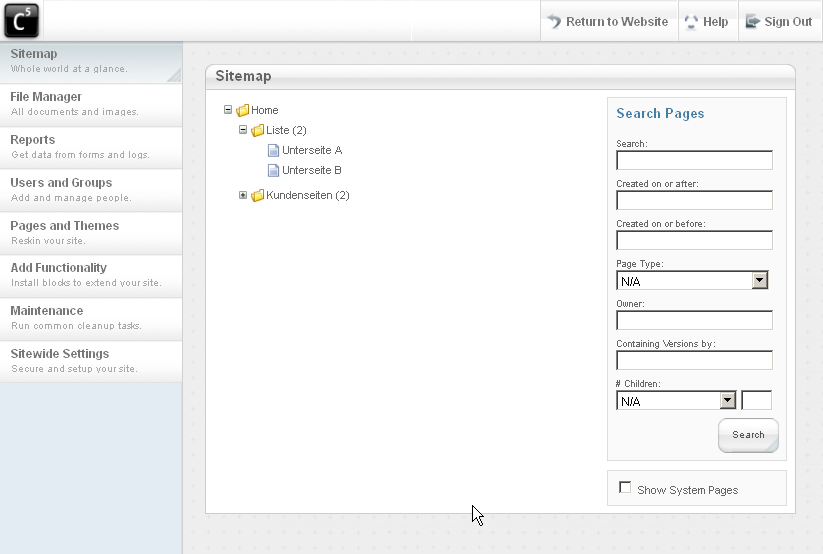
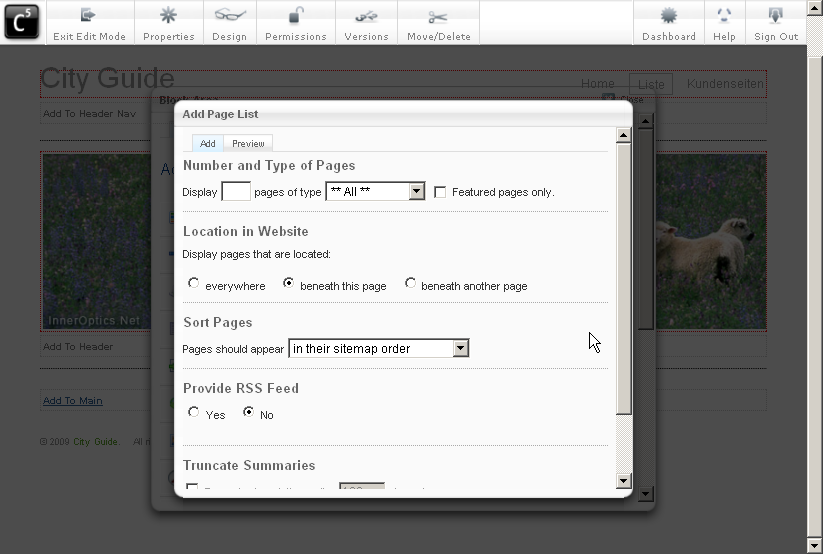
The sites “Untereite A” and “Unterseite B” should be part of a list. To achieve this, we’ll add a page list block to the parent page:
We just created a simple list:
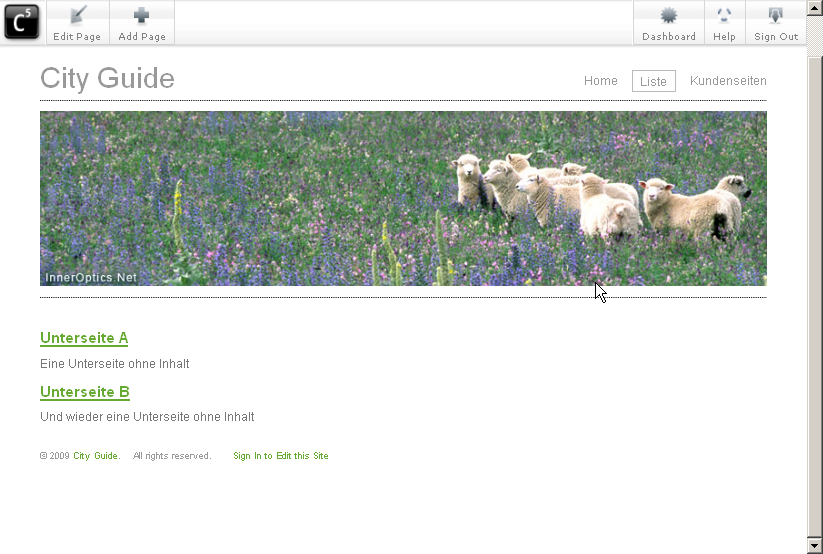
The layout isn’t perfect, but we can modify the CSS! But what if we want to add a thumbnail? CSS isn’t enough anymore and we need to create a custom template!
30 Comments
The code in this tutorial doesn’t work with 5.3 anymore because of some API changes. I’ll update it as soon as possible. Until then, this might help:
http://www.concrete5.org/community/forums/usage/thumbnails_in_5_3
Hey, this is an awesome addition to the page list block, just what I was looking for. One question though, is there any way to force a square thumbnail to be generated instead of a proportionate one?
Hey Peter,
as far as I know, there’s not easy “out of the box” solution to this. As a matter of fact we just talked about a similar issue at work today.
We ended up creating our thumbnails using Photoshop due to a simple reason – we never knew which part of the picture the important one is, without looking at it. Otherwise I would have built it already..
But it’s not a difficult thing to add another “thumbnail” method that also crops the picture by removing an equal part from the left and right or from the top and bottom…
I’ll try to keep my ears open about this function, I’ll try to post it once I found one or once someone wrote one..
[…] know anything about “Custom Templates”, you should probably read this article first: http://www.codeblog.ch/2009/03/concrete5-templates/. In short: Concrete5 allows you to style any block using templates in case you need to change the […]
I can’t get this to work on 5.3 despite following your instructions to the letter. Is there an update I’ve spent a lot of time on this?
On page 2 there’s a note which shows you the code which I’ve tested with 5.3. If this doens’t work for you – please explain what doesn’t work for you.
Hello Remo
I am trying to add an extra thumbnail to the listings page. I have searched just about everywhere possible with no result. Unfortunately I am limited by my PHP knowledge. Could you help a brother out and point me in the right direction:)
Many regard
The tutorial has all the information you need. Just add a new page attribute and duplicate the code which fetches and prints the Attribute.
The new code could look like this:
That’s it!
Remo that worked like a charm, you make it seem so easy. Thanks for your help:)
I’m having a minor problem with this Fix.
I’ve followed the tutorial.
From the point;
“After we created the template, we have to navigate back to the page where we added our page list block:”
I selected “set custom template” which is now called “custom template” in Concrete 5.3.3 and all i get is only one thumbnail which was chosen after selecting a custom field. I’m using the thumbnail.php code found above on;
Concrete5.3 (Update: 24th April 2009)
Can someone please help me. I’m under pressure here.
Regards
It’s a bit hard to help you with so little information.
You must select a picture/thumbnail for each page using “properties”. Otherwise it won’t be able to show you anything else but a text.
Just open all the sub pages for which you don’t see a thumbnail and edit them, hit properties, custom fields and add select a thumbnail/file.
[…] If you haven’t worked with custom template you should probably read this tutorial first: http://www.codeblog.ch/2009/03/concrete5-templates/. […]
Do you know what code you need to include other custom attributes that are text/selectors etc as we need to be able to filter by attribute. We are developing an accommodation site that needs to filter by accommodation location for example and we need the page-list to determine this when showing the list.
Cheers
I’d have to look that up as well. But try this, it should give you a couple of information:
print_r($cobj->getAttribute(‘your_attribute’));
How can you add a thumbnail using the “getAttribute” to display a thumbnail in the BLOG Add On.
The following piece of code worked before for Blog 1.5.1
setAttributethe(‘thumbnail’)): ?>
<a href="”><img src="getThumbnail($blog_post->getAttribute(‘thumbnail’), 125, 94)->src ?>” class=”left bordered” alt=”getCollectionName() ?>”/>
With the upgrade (Version 1.2.3) this approach doesn’t work.
Please, do you have any ideas as to what I can change?
There were some changes in the Concrete5 API, but I don’t see why this should be blog related. But since the Blog addon isn’t free, I can’t help you with it, you should ask the authors of the package for help.
But you did see that I’ve posted different examples on how to output a thumbnail, depending on your c5 version?
Hi, the thumbnails are working like a charm for me.
I am thinking of linking the thumbnails and remove the titles!
How can I do it?
surround the img-tag by the a-tag and remove h3-tag afterwards.
Hi Remo its me again 🙂 sorry!
I am just wondering why only 10 page list thumbnail are shown.
Have you seen this issue before?
Here is the link of the template I am using: http://www.concrete5.org/download_file/-/20658/
oafreelancer.com
Hi,
I used this code but keep getting this error when I try to publish it.
Fatal error: Cannot redeclare class ImageHelper in /var/www/html/bimag/concrete/helpers/image.php on line 20
I looked it up in the forums and they said define the imagehelper as siteimagehelper but I don’t see this in the code. So I’m kind of confused. I was also trying to display the images inline with the text via css but this did not work either. Any help would be greatly appreciated.
This errors message means that you’ve included it twice! Just remove one of it and it should work.
Hi Remo,
You were right and that fixed it. If I can bug you one more time. Is it possible to get the thumbnail to appear inline with the text?
Kind of, the problem is that the field from where you pull the text doesn’t have an image in it. How should the template know where to place the picture? You could insert a placeholder in the description (image-placeholder) and replace that with the picture. Not a super nice solution but it would work.
Hey!
I`ve spent a lot of time trying to force it to work – but with no success…
I created custom attributes for file./image – but getAttribute seems to ignore it.
Checking attribute status gives an error…
The whole output looks like:
“Fatal error: Call to a member function outputThumbnail() on a non-object in /****/public_html/blocks/page_list/templates/miniatury.php on line 21”
I checked also getThumbnail method – also no success. My attribute is still not taken… Is there another change in API for version 5.4.1???
Please help!
I’d start by making sure there’s an object in the variable, try to put this code in the template and see what it prints:
but make sure you change the word thumbnail according to the handle of your attribute.
hey there, has this tutorial been updated? I see a note from Remo above that some things broke with the C5 update.
Which comment do you mean? I don’t have any information about problems with this template..
Hi
I read all what is written here, and I try many time to do that, but I failed.
Please tel me how code should lok like, wit all changes.
Thank you
Regards
Boki
Hi Boki
it was my intention not to publish the complete code as the base template often changes and usually causes a lot more requests.
If my instructions aren’t clear, I’d like to improve them. Can you please post the code you have so far? I might be able to see the issue and update my instructions accordingly.
Thanks,
Remo
hi Remo,
That worked perfectly thanks.
Jan