Concrete5 offers you a lot of blocks you can add to your page. But sometimes you might want to have a certain block on every page. How do you do that?
There are two possibilities!
Page Defaults
Concrete5 has a feature called “Page Defaults”. You’ll find it in the dashboard:
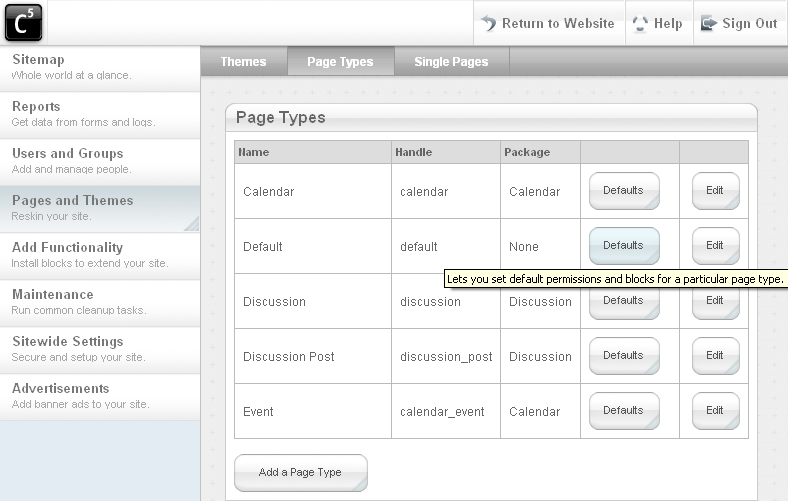
By clicking on “Defaults” you’ll able the “Page Type” instead of a simple page. When you add a block there, it will appear on every new page you add. If you click on a block while you’re editing a “Page Type”, you’ll see this menu:
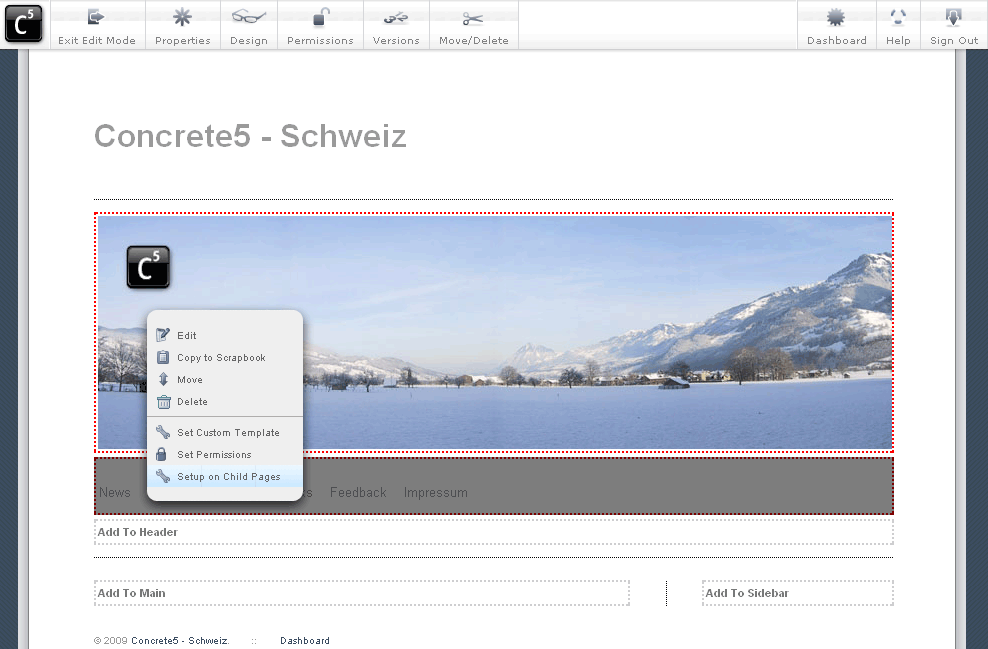
It’s quite handy as it makes it possible to deploy the blocks you’ve just added to the existing pages. It’s probably still easier if you add the blocks to the page type before you create all the pages, but that’s up to you.
If you add your default blocks using this method, they’ll be editable by the users unless you use the advanced permissions model. Using the advanced permission model is fine, but sometimes too complicated for a small page. What if you want to make sure every page contains a navigation without using the advanced permission model? Go to the next page!
17 Comments
Wie schaffe ich es, dass der Menüpunkt der aktuellen Seite hervorgehoben wird (active)?
Das ist abhängig vom Template. Im Standard-Template wird zum Beispiel die CSS Klasse “nav-selected” verwendet. Also ganz einfach im CSS eine Anweisung wie diese einfügen:
.nav-selected {
font-weight: bold;
}
Sprekenzie deutsch? No, not really, but I am learning C5 thanks to these tutorials. Thanks!
Here are the autonav attributes and values I found by looking at the code:
controller->orderBy = ‘display_asc’;
//$bt_links->controller->displayUnavailablePages = ‘false’;
$bt_links->controller->displayPages=’second_level’;
$bt_links->controller->displaySubPages = ‘none’;
$bt_links->controller->displaySubPageLevels = ‘enough’;
$bt_links->render(‘view’);
?>
‘orderBy’
‘display_asc’ – in their sitemap order
‘display_desc’ – in reverse sitemap order
‘chrono_desc’ – with the most recent first
‘chrono_asc’ – with the earliest first
‘alpha_asc’ – in alphabetical order
‘alpha_desc’ – in reverse alphabetical order
‘displayUnavailablePages’
?’true’/’false’? (not sure if value be quoted)
‘displayPages’
‘top’ – at the top level
‘second_level’ – at the second level
‘third_level’ – at the third level
‘above’ – at the level above
‘current’ – at the current level
‘below’ – at the level below
‘custom’ – beneath a particular page
‘displaySubPages’
‘none’ – none
‘relevant’ – Relevant sub pages
‘relevant_breadcrumb’ – Display breadcrumb trail
‘all’ – Display all
‘displaySubPageLevels’
‘enough’ – Display sub pages to current
‘enough_plus1’ – Display sub pages to current +1
‘all’ – Display all
‘custom’ – Display a custom amount
‘render’
‘view’ – use default view
‘templates/custom_view’ – apply custom template
Die Zeilenangaben passen überhaupt nicht zum angezeigten Code.
Gruß
Hab’s korrigiert! Danke!
Sweet! Danke, nach den Infos hab ich gesucht!
I used this method to modify the “full width” page type, adding a phone number above the navigation. But when I view the site following the update, the phone number is located below the navigation. If I go back to the “full width” template, the phone number is in the correct location. Why is it flipping positions on the child pages?
I doubt that’s related to this block. You should probably use a forum and post a link to the site – it’s a lot easier to help you if it isn’t just about theory.
DEUTSCH:
Ich möchte bei einem Theme-Page-Type einen vorgegebenen nicht lösch- oder verschiebbaren Block (z.B. den Blocktyp “Slideshow”) verpassen, welcher aber Einstellbar ist (z.B. Bilderauswahl).
ENGLISH:
How to implement a Blocktype (for example “slideshow”) in a pagetype of a theme permanently which is still customizable (assortment of pictures)?
Chris, for this you should try to work with the advanced permission mode:
I was having a hard time trying to implement changes to child pages. Until I read this tutorial. Thank you again.
Hi there!
I defiened a block slideshow on every page using the Page Type method, I also limited the number of Blocks to one (using setBlockLimit), but someone is still able to add more than one block (through deleting and re-adding) as well as blocks of an other type.
is ist possible to prohibit the deleting of the block but still allow to change it (i.e. change the pictures by an other user, not admin).
setBlockLimit only means that there can never be more than one block at the same time. This doesn’t mean that only the admin can remove it or anything like that.
There are some patches in the forums that allow you to specify the block types allowed in an area but as far as I know they never made it into the core.
The only thing you can do out of the box is to use the “advanced permission mode”. Check this site: http://www.concrete5.org/documentation/general-topics/simple-permissions/ There’s a line you have to insert in site/config.php to enable it.
But be careful: The advanced permission mode gives you a lot of power and increases the complexity as well. Just give it a try, you can always remove the line and go back to the basic permission mode if you don’t want to use the advanced settings.
Defaults doesnt really work does it? If Im in page type default and add a html block and some html within it, I’d expect the html that I wrote to be in every page that uses this page type. But it doesn’t do that.
So what exactly default is I dont know and no one has be any to match their description with what it actually does. (same as composer)
That’s probably because you’ve created the page first and then added blocks to the page defaults. Concrete5 can’t know if you’ve manually added that block on the previously created page first in which case it should put the block from page defaults there.
However, when you’re editing the page defaults and add a block, you can click on it again and you’ll see a menu entry which allows you to set up the block on existing pages as well.
Open it and you’ll see a list of all pages from the same type, mark those where you’d like to place the block and you’re done.
I give up. Thanks anyway.