Have you ever tried to create a short preview text using PHP? Did you just count the characters and ended up having texts with a completely different width like shown on this picture?
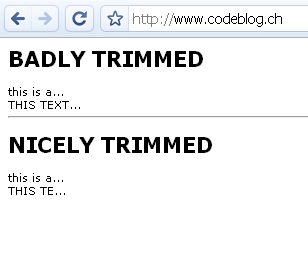
This tutorial describes a small method which calculates the real width of a string and lets you create better looking preview texts!
Measuring string width
PHP offers several methods to measure a string width. You can use the built in method ImageFontWidth to measure the width of a string using the built in PHP fonts. This is quite easy and works well if you want to create a captcha or something similar, using the PHP fonts.
But there’s another method which you can easily use to get the complete bounding box of a true type font string. It’s called imagettfbbox. The return value is an array which contains several values needed for a bounding box.
The trimming method
As you’ve probably seen on the picure at the beginning of the article, I needed a method that cuts off a string after a certain width and adds a string to indicate that the text isn’t completely shown. Here’s some code:
1 2 3 4 5 6 7 8 9 10 11 12 13 14 15 16 17 18 19 20 21 22 23 | function trim_by_width($text,$width,$font_file,$font_size=7,$append_string = '...') { $append_string_box = imagettfbbox($font_size,0,$font_file,$append_string); $append_string_width = $append_string_box[2]; $str_len = strlen($text); for ($i = 0; $i<=$str_len; $i++) { $trimmed_text = substr($text,0,$i); $bounding_box = imagettfbbox($font_size,0,$font_file,$trimmed_text); $trimmed_text_width = $bounding_box[2]; if ($trimmed_text_width + $append_string_width > $width && $i > 0) { $str_to_return = substr($trimmed_text,0,strlen($trimmed_text)-1); if ($trimmed_text_width != $str_len) { $str_to_return .= $append_string; } return $str_to_return; } } return $text; } |
$trimmed_text = trim_by_width($text, $width, $font_file, $font_size, $append_string='...'); |
$text:
The first parameter is the string which you want to trim
$width:
This defines the maximum width of the text in pixels! Not in characters or anything else
$font_file:
Here you have to specify the location of your true type font file.
$font_size:
The font size you want to use. Please note that unit depends on the version of the GD library you're using. GD1 uses pixels, whereas GD2 uses points
$append_string:
An optional string to define the text appended at the end of a trimmed text. By default set to "..."
An example
You can call the method like this:
echo trim_by_width('this is a long text',55,dirname(__FILE__) . '/verdana.ttf',8); |
It assumes that the file verdana.ttf is in the same directory as the php script. It will cut the text “this is a long text” after 55 pixels.
That’s it!
4 Comments
[…] post: Smart text trimming with PHP Posted in PHP | Tags: a-small-method, a-string-and, a-string-using, a-string-width-, […]
For SEO purposes, providing the full text would be the ideal solution. Look into the css property text-overflow: ellipsis.
http://www.quirksmode.org/css/textoverflow.html
Thanks, you’re right, text-overflow is great if you need SEO, but sometimes if you have a huge list with a ton of elements you might want to keep things short. Or imagine if you wanted to create a plain text mail, text-overflow won’t work then…
At the end I’d recommend to keep both solutions in your pockets!
Thanks for sharing, very useful function!