Möchte man einen kurzen Vorschautext in PHP erstellen, der einen Anriss des effektiven Textes zeigt, so wird man wohl oft die einfachste Variante gewählt haben, und einfach nach einer Anzahl definierten Zeichen abgeschnitten haben. Dies generiert jedoch ein unschönes Ergebnis, wenn man eine proportionale Schrift verwendet. Sämtliche Text haben markant unterschiedliche Längen wie auf diesem Bild gezeigt wird:
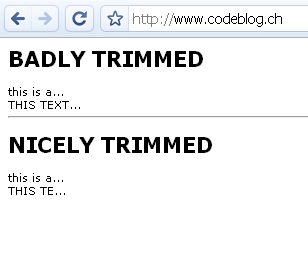
Dieser Artikel zeigt einen einfachen Ansatz, diese Problematik etwas eleganter zu lösen!
Have you ever tried to create a short preview text using PHP? Did you just count the characters and ended up having texts with a completely different width like shown on this picture?
This tutorial describes a small method which calculates the real width of a string and lets you create better looking preview texts!
Textlänge messen
PHP bietet verschiedene Methoden um die Länge eines Textes zu messen. Zum Beispiel die Methode ImageFontWidth welche die Länge der PHP internen Schriften einfach und gut messen kann. Möchte man ein einfaches Captcha erstellen, das die internen Schriften verwendet, ist diese Methode sicherlich eine gute Wahl.
Allerdings gibt’s noch eine andere Methode, welche die komplette “Bounding Box” errechnet. Sie lautet imagettfbbox. Der Rückgabe-Wert ist eine Array welches sämtliche Werte für die “Bounding Box” enthält.
Die Methode
Wie zu Beginn des Artikels gezeigt, wollte ich eine Methode die den Text kürzt und am Ende einen weiteren Text (in diesem Fall “…”) anhängt um zu zeigen, dass der Text nicht vollständig ist.
1 2 3 4 5 6 7 8 9 10 11 12 13 14 15 16 17 18 19 20 21 22 23 | function trim_by_width($text,$width,$font_file,$font_size=7,$append_string = '...') { $append_string_box = imagettfbbox($font_size,0,$font_file,$append_string); $append_string_width = $append_string_box[2]; $str_len = strlen($text); for ($i = 0; $i<=$str_len; $i++) { $trimmed_text = substr($text,0,$i); $bounding_box = imagettfbbox($font_size,0,$font_file,$trimmed_text); $trimmed_text_width = $bounding_box[2]; if ($trimmed_text_width + $append_string_width > $width && $i > 0) { $str_to_return = substr($trimmed_text,0,strlen($trimmed_text)-1); if ($trimmed_text_width != $str_len) { $str_to_return .= $append_string; } return $str_to_return; } } return $text; } |
$trimmed_text = trim_by_width($text, $width, $font_file, $font_size, $append_string='...'); |
$text:
Der Text der zu kürzen
$width:
Die maximale Länge des Textes in Pixel!
$font_file:
Die True Type Schriftendatei
$font_size:
Die Schriftgrösse. Bitte beachten Sie, dass die Einheiten je nach GD Version anders sind. GD1 verwendet Pixel, GD2 hingegen Punkte./code>
$append_string:
Ein optionaler String welcher bei gekürzten Texten angehängt wird. Standardmässig "..."
Beispiel
Sie können die Methode nach folgendem Schema aufrufen:
echo trim_by_width('this is a long text',55,dirname(__FILE__) . '/verdana.ttf',8); |
Das Script geht davon aus, dass sich die Datei verdana.ttf im gleichen Verzeichnis wie das PHP Script befindet. Anschliessend wird der Text nach 55 Pixel gekürzt und ausgegeben.
Fertig!
Measuring string width
PHP offers several methods to measure a string width. You can use the built in method ImageFontWidth to measure the width of a string using the built in PHP fonts. This is quite easy and works well if you want to create a captcha or something similar, using the PHP fonts.
But there's another method which you can easily use to get the complete bounding box of a true type font string. It's called imagettfbbox. The return value is an array which contains several values needed for a bounding box.
The trimming method
As you've probably seen on the picure at the beginning of the article, I needed a method that cuts off a string after a certain width and adds a string to indicate that the text isn't completely shown. Here's some code:
1 2 3 4 5 6 7 8 9 10 11 12 13 14 15 16 17 18 19 20 21 22 23 | function trim_by_width($text,$width,$font_file,$font_size=7,$append_string = '...') { $append_string_box = imagettfbbox($font_size,0,$font_file,$append_string); $append_string_width = $append_string_box[2]; $str_len = strlen($text); for ($i = 0; $i<=$str_len; $i++) { $trimmed_text = substr($text,0,$i); $bounding_box = imagettfbbox($font_size,0,$font_file,$trimmed_text); $trimmed_text_width = $bounding_box[2]; if ($trimmed_text_width + $append_string_width > $width && $i > 0) { $str_to_return = substr($trimmed_text,0,strlen($trimmed_text)-1); if ($trimmed_text_width != $str_len) { $str_to_return .= $append_string; } return $str_to_return; } } return $text; } |
$trimmed_text = trim_by_width($text, $width, $font_file, $font_size, $append_string='...'); |
$text:
The first parameter is the string which you want to trim
$width:
This defines the maximum width of the text in pixels! Not in characters or anything else
$font_file:
Here you have to specify the location of your true type font file.
$font_size:
The font size you want to use. Please note that unit depends on the version of the GD library you're using. GD1 uses pixels, whereas GD2 uses points
$append_string:
An optional string to define the text appended at the end of a trimmed text. By default set to "..."
An example
You can call the method like this:
echo trim_by_width('this is a long text',55,dirname(__FILE__) . '/verdana.ttf',8); |
It assumes that the file verdana.ttf is in the same directory as the php script. It will cut the text "this is a long text" after 55 pixels.
That's it!
4 Comments
[…] post: Smart text trimming with PHP Posted in PHP | Tags: a-small-method, a-string-and, a-string-using, a-string-width-, […]
For SEO purposes, providing the full text would be the ideal solution. Look into the css property text-overflow: ellipsis.
http://www.quirksmode.org/css/textoverflow.html
Thanks, you’re right, text-overflow is great if you need SEO, but sometimes if you have a huge list with a ton of elements you might want to keep things short. Or imagine if you wanted to create a plain text mail, text-overflow won’t work then…
At the end I’d recommend to keep both solutions in your pockets!
Thanks for sharing, very useful function!