Uncategorized (10)


Monitor invalid SSL certificates

It shouldn’t happen, but as often, it can still happen. Sometimes SSL certificates aren’t created properly. The result of it can be a nasty error message like this:

certificate routines:X509_check_private_key:key values mismatch

In my case it was reported by nginx with this:

Apr 27 05:30:51 localhost nginx-rc[3120]: nginx: [emerg] SSL_CTX_use_PrivateKey(“/etc/nginx-rc/conf.d/my-server.d/server.key”) failed (SSL: error:0B080074:x509 certificate routines:X509_check_private_key:key values mismatch)

As you can see, it is reported as “emerg” which means nginx won’t be happy about this. In my case this problem caused other vhosts to fail as nginx couldn’t reload the configuration and thus couldn’t reload the new letsencrypt certificates.

Since I was a bit in a rush I just rebooted the server, but that made it even worse. nginx didn’t start at all and I had to look at the log files a bit closer. Recreating the certificate that wasn’t created correctly was all it took, but knowing that you have to do that, is what’s tricky.

Get telegram message if a certificate is invalid

If you haven’t sent a message to telegram from your command line, check this article: https://www.marcodena.it/blog/telegram-logging-handler-for-python-java-bash/

In short:

  • You befriend the botfather
  • You issue a command /newbot, enter a name and you’ll get token
  • You start a conversation with your bot and use that chat id in your script

We can use openssl to get the modulus of the key as well as the certificate. They both have to match, otherwise the certificate is all it takes. My script is used with runcloud, but just adjust the path in the loop to get it working in your environment:

#!/bin/bash
TELEGRAM_TOKEN=<token from telegram>
TELEGRAM_CHAT_ID=<chat id from telegram>

URL="https://api.telegram.org/bot$TELEGRAM_TOKEN/sendMessage"

shopt -s globstar

for keyFile in /etc/nginx-rc/conf.d/*/server.key; do
   crtFile="${keyFile::-3}crt"
   keyFileModulus=$(openssl x509 -noout -modulus -in $crtFile)
   crtFileModulus=$(openssl rsa -noout -modulus -in $keyFile)
   if [ "$crtFileModulus" != "$keyFileModulus" ]; then
      curl -s -X POST $URL -d chat_id=$TELEGRAM_CHAT_ID -d text="SSL certificate is invalid, recreate $keyFile" > /dev/null
   fi
done
concrete5 – package installer based on XML file

If you ever built a concrete5 package before, you’ll probably have had to write some code to handle the installation process where you check if an object is already installed and if not, add it. Especially with packages that are in use, this can take a while and the code gets messy very quickly. However, there’s an alternative which is not yet well known.

Creating installation XML

Before we start looking at some code, how do we get our XML content? There are a ton of different objects, but luckily, we can generate an XML from an existing site very easily. To do that, you’ll have to install the Sampel Content Generator you can find here http://www.concrete5.org/marketplace/addons/sample-content-generator/. Please note that you currently have to install it manually as it’s marked as incompatible with version 5.6.

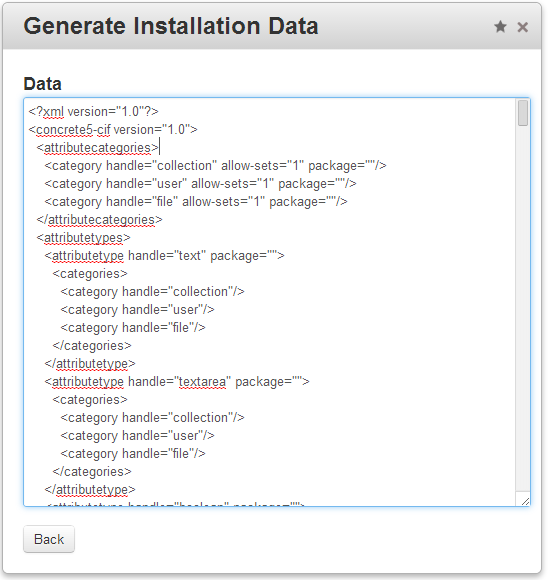
Once you’ve installed the add-on, you can find a new single page in your dashboard. If you open it, you’ll find two buttons, the first one “Archive Files” to create a complete zip file of the site and the second one “Generate content.xml from current website” to get the output we’re looking for. If you click on the second button, you’ll see a screen like this:

installation-data

The output you can see in this screen contains everything you’ve got in your site. That’s way too much for a package but it’s pretty easy to find the elements you need. Most elements are pretty self-explanatory. In my example, I’ve needed two elements, one I had to add using a previous version of my package controller (attributetypes) and one I’ve added in the dashboard (attributetypes). The complete content of my XML looks like this:

1
2
3
4
5
6
7
8
9
10
11
12
13
<?xml version="1.0"?>
<concrete5-cif version="1.0">    
    <attributetypes>
        <attributetype handle="remo_phasher" package="remo_phasher">
            <categories>
                <category handle="file"/>
            </categories>
        </attributetype>
    </attributetypes>    
    <attributekeys>
        <attributekey handle="image_hash" name="Image Hash" package="" searchable="1" indexed="1" type="remo_phasher" category="file"/>
    </attributekeys>
</concrete5-cif>

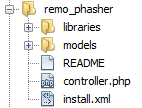
I’ll put this content in a file called install.xml right in the root of the package. It looks like this:

file-structure

Install XML content from package controller

In our package controller, all we need is this:

1
2
3
4
5
6
7
8
9
10
11
12
13
14
15
16
17
18
19
20
21
22
23
24
25
26
27
28
29
30
31
32
33
<?php
 
defined('C5_EXECUTE') or die('Access Denied.');
 
class RemoPhasherPackage extends Package {
 
    protected $pkgHandle = 'remo_phasher';
    protected $appVersionRequired = '5.6.2.1';
    protected $pkgVersion = '0.9';
 
    public function getPackageDescription() {
        return t("Adds perceptual hash to images.");
    }
 
    public function getPackageName() {
        return t("Image pHasher");
    }
 
    public function install() {
        $pkg = parent::install();
 
        $ci = new ContentImporter();
        $ci->importContentFile($pkg->getPackagePath() . '/install.xml');
    }
 
    public function upgrade() {
        $pkg = Package::getByHandle($this->pkgHandle);
        $ci = new ContentImporter();
        $ci->importContentFile($pkg->getPackagePath() . '/install.xml');
 
        parent::upgrade();
    }
}

We simply get an instance of ContentImporter and import the content of our XML file in both methods, install as well as upgrade. If you need a new item, just add it to install.xml and you’re good to go. You can find a complete example on github: https://github.com/Remo/concrete5-phasher.


My answer to the most difficult Sudoku

A coder likes riddles like coding. Unlike my post about the number of zeros at the end of the result of 1000! this post does not even have any code in it. I found a post about a sudoku which is supposed to be the most difficult of its kind, check this link for more information: http://www.chinaabout.net/69-year-old-chinese-farmer-answer-difficult-sudoku-world/.

There’s one solution in the article, the second one is missing. Suspicious how I am, I had to check if there’s a second solution. It turns out there is, here’s my solution:

8 1 2 | 7 5 3 | 6 4 9
9 4 3 | 6 8 2 | 1 7 5
6 7 5 | 4 9 1 | 2 8 3
------+-------+------
1 5 4 | 2 3 7 | 8 9 6
3 6 9 | 8 4 5 | 7 2 1
2 8 7 | 1 6 9 | 5 3 4
------+-------+------
5 2 1 | 9 7 4 | 3 6 8
4 3 8 | 5 2 6 | 9 1 7
7 9 6 | 3 1 8 | 4 5 2

What I don’t understand is how one knows whether it’s the most difficult sudoku. Anyone knows more than I do?


Maximum Length of a website address / URL

Short story about maximum URL length

Make sure your URLs aren’t longer than 2’000 characters

Long Story about the maximum URL length

As a web developer you’ve probably seen a GET method request a few times. If you have a form and submit it, all the parameters including their values are appended to the browser URL. The more parameters you have to longer the address gets. You can use a POST method if you want to transfer more data but a GET request has the benefit of being link-able – you can copy the whole address and send it to anyone.

While you might want to avoid that in certain cases due to aesthetic reasons, there’s also a technical limit.

The standard RFC2616 specified that your URL should not exceed 255 bytes, check 3.2.1 in this document: http://www.faqs.org/rfcs/rfc2616.html.

It turns out that you can use up to 2’000 characters and it also turns out that someone had a closer look. Check this page more information http://www.boutell.com/newfaq/misc/urllength.html


Vorschau Text mit PHPSmart text trimming with PHP

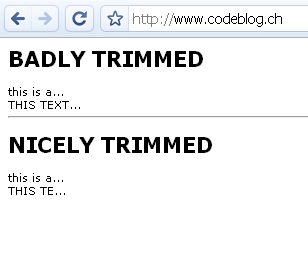
Möchte man einen kurzen Vorschautext in PHP erstellen, der einen Anriss des effektiven Textes zeigt, so wird man wohl oft die einfachste Variante gewählt haben, und einfach nach einer Anzahl definierten Zeichen abgeschnitten haben. Dies generiert jedoch ein unschönes Ergebnis, wenn man eine proportionale Schrift verwendet. Sämtliche Text haben markant unterschiedliche Längen wie auf diesem Bild gezeigt wird:

text-trimming

Dieser Artikel zeigt einen einfachen Ansatz, diese Problematik etwas eleganter zu lösen!

Have you ever tried to create a short preview text using PHP? Did you just count the characters and ended up having texts with a completely different width like shown on this picture?

text-trimming

This tutorial describes a small method which calculates the real width of a string and lets you create better looking preview texts!


Schriften im Internet – Cufón

Schriften im Internet

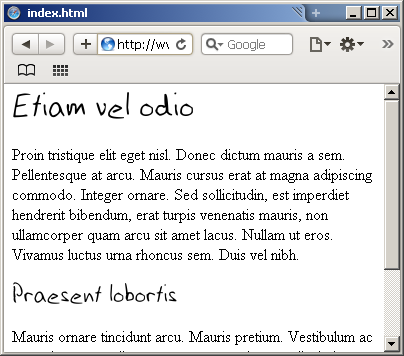
Schriften unter Internetseiten ist seit langem ein beliebtes Thema. Grafiker wollen logischerweise völlige Freiheiten, der Programmierer eine solide Lösung die keine Probleme verursacht. Oft interessiert es den Leser nicht in welcher Schrift etwas dargestellt wird, solange der Inhalt lesbar ist. Bei kleinen Seiten mit wenig Inhalt spielen Schriften jedoch schnell eine grössere Rolle.

Wie kann man sowas umsetzen:

font


Mac OS X – Maus Beschleunigung

Zugegeben etwas ungewöhnlich und vermutlich kein grosses Problem für die meisten Leute. Bei der Mausbeschleunigung geht es darum, dass man für einen Monitor der 50cm breit ist, die Maus nicht 50cm weit bewegen muss. Dabei muss es trotzdem möglich sein, kleine Distanzen präzise zurückzulegen. Das führt dazu, das sich der Mauszeiger in einer nicht linearen Form gegenüber der Mausbewegung verschiebt.

Was hat das mit Mac OS X zu tun? Ich selbst besitze zwei Computer von Apple, ein Mac Mini und ein Macbook Pro mit einem Intel Prozessor.

So lächerlich das klingt – der Hauptgrund, wieso ich auf meinem Macbook kaum mit OS X arbeite ist, dass ich mit der Maus nicht umgehen kann. Es passt mir regelmässig, dass ich die Icons verfehle!

Hier gibt es jedoch Abhilfe – ein gratis Tool mit dem Namen “MouseFix”. MouseFix Seite

Das beste OS X Tool das ich je gefunden habe!

😉


Schriften vektorisieren

Es gab noch Zeiten, da wollen Leute ihren Text vektorierisieren um mehr Freiheiten zu haben. Inzwischen gibt es Leute die finden noch ganz andere unnötige Gründe wieso man einen Text in einen “Pfad” umwandeln möchte. Sei es weil man zum Beispiel mit PHP einen Text ausgeben möchte, ohne FreeType (zusammen mit GD) zu verwenden. Eine Situation die wohl fast nie vorkommt, trotzdem ein kurzer Artikel zu diesem (eher spielerischen) Thema.


Icons

Egal ob Webdesigner oder Softwareentwickler – Icons braucht man bei fast jedem Projekt. Dankbarerweise gibt es zahlreiche Grafiker, die ihre Kunstwerke zur freien Verfügung ins Internet gestellt haben. Hier eine Liste von Seiten die wir im codeforum.ch gesammelt haben (http://codeforum.ch/index.php/topic,3503.0.html)


codeblog.ch eröffnet

Als Spin-Off zu codeforum.ch, ein Forum indem ich öfters anzutreffen bin, gibt es nun codeblog.ch. Momentan noch leer und erst seit ein paar Minuten online, noch nicht besonders spannend.

Ich hoffe aber, dass mit der Zeit verschiedene Personen Artikel hier publizieren werden. Ein kleiner Wunsch wäre noch immer die Integration in codeforum.ch so dass man nur eine Seite besuchen muss um zu sehen was es denn neues auf code*.ch gibt!