Aufgrund von zeitlichen Einschränkungen ist es nun eine Weile her als ich etwas auf codeblog publiziert habe. Heute ist es kein Artikel, für Erklärungen hat’s leider nicht gerreicht. Dafür aber ein gratis Block für eure Internetseite.
Ein simpler Block im Inhalt anzuzeigen den man bei Bedarf aus- und wieder einblenden kann:
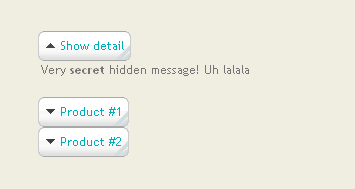
Due to limited time I wasn’t able to write new articles for codeblog. This time there’s not going to be much text, just a free block which you can use for your site.
Dialog
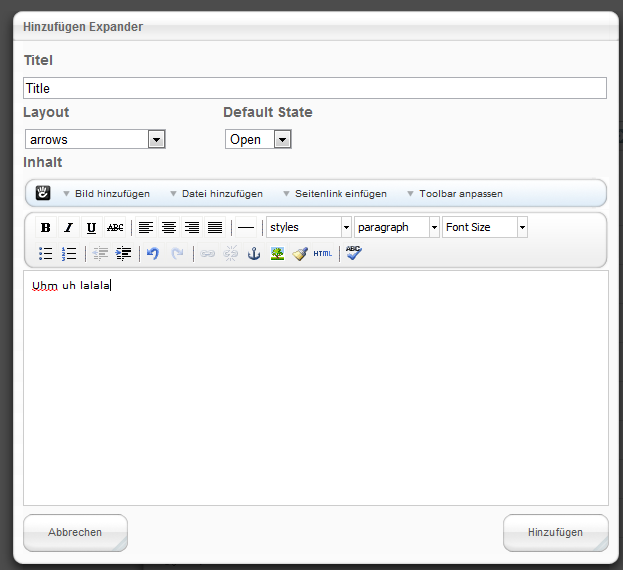
Der folgende Screenshot zeigt den Dialog wo sämtliche Informationen eingegeben werden können. Speziell ist, dass man bei diesem Block das Layout gleich in der Eingabemaske definieren kann.
Erweiterungen
Sollte jemand ein paar Pfeile/Layouts haben, bitte kontaktiert mich. Ich würde gerne ein paar Templates einbinden so dass der Block später im Concrete5 Marktplatz veröffentlich werden kann.
Installation
Die ZIP Datei in /blocks/ extrahieren. Sicherstellen dass der Ordner “remo_expand” vorhanden ist. Viel Spass!
Dialog
The following screenshot shows you the dialog you can use to enter the information related to the expand block. There’s a special feature which I haven’t seen before – you can select the template while adding a new block. No need to open a second dialog!
Updates / Contribution
If you have some nice arrows/layouts. Please contact me! I’d be happy to add them to this block which we could later publish on the Concrete5 Marketplace once it contains a few nice layouts!
Download / Installation
Extract the zip file into /blocks/ and make sure you keep the directory “remo_expand”. It’s not a package yet and therefore must be extracted to blocks and not packages!
10 Comments
Was just trying to put together something lie this myself, saved me a load of time.
Love being able select the template when adding the block – that should be added to all blocks in C5.
Remo,
This is an excellent addition to the concrete5 marketplace and for free too. The block works very well and as expected. Really easy to use and produces the desired results.
I am extremely pleased with the expand/collapse block
Many thanks for your time and effort
Cheers
Sean
Nicely done and certainly very usefull 😉
Would be great (amazing?) to add this kind of feature to autonav :s
You can easily add such features to the autonav block. No need for a custom block, a simple custom template would be enough..
You need to understand php and custom template (http://www.codeblog.ch/2009/03/concrete5-templates/) and a little bit of javascript but it’s not difficult to do.
Well, in general yes.. But:
1. I’m very busy at the moment
2. What script? How is it related to the expand/collapse block?
Well, I think what _n3o is saying, is that if this could be applied to a sidebar nav it would be great ie. like an accordion sidebar menu that would expand when the user clicks in it.
bellir
On the expand/collapse block, I am getting only one arrow. I wanted to create a few collapsed (or expanded lines) like the example, but was not able to. I tried to play around with the open/closed drop down but it did not work.
There are more autonav examples in my upcoming book http://www.codeblog.ch/2010/12/concrete5-beginners-guide-book/. I’m going to write some more tutorials once I finished the book but there’s not enough time right now.
I also can’t reproduce a problem with the arrows. I think I’ve updated the version in the marketplace a while ago, could you please try and use the one available here http://www.concrete5.org/marketplace/addons/expand-collapse/ ?
thanks
Hi Remo,
I have multiple expandcollapse blocks and I want to be able to auto expand a particular one when clicked on a link on a different page.
So far looks like the block doesn’t support that, but I am wondering if I could use your guidance on how to modify it to accommodate my needs.
Thanks a lot!
I’ll look into this, posted it here to keep track of the issue: http://code.google.com/p/concrete5-expand-collapse/issues/detail?id=1